Streams
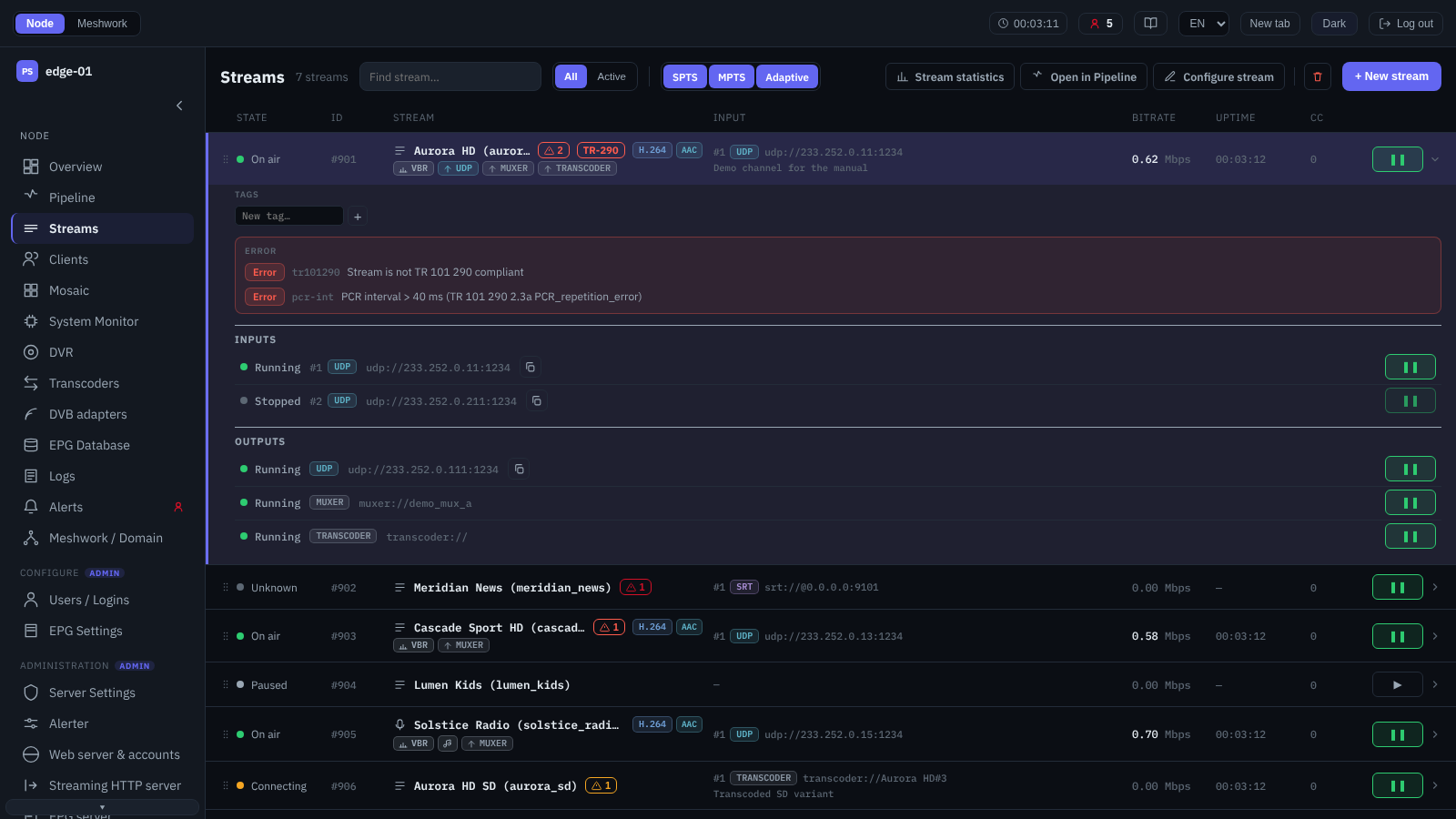
The Streams screen: stream list with an expanded row.
The Streams screen is the node’s central workplace, a single list of the configured streams with their state, active input, bitrate, “Uptime” and the “CC” continuity error counter. The active input is marked by a number and a transport badge, #2 and, say, udp; the number shows the input’s place in the redundancy list, the same one the input has in the expanded row, in the stream editor and in the text of an alert (Source redundancy). Every row expands on a click and shows the stream’s inputs and outputs with their state, redundancy priority, notes and active alerts; an individual input or output can be paused and resumed from here, and the “Show in library” button next to the address opens the list of the other points of the domain on that address (Library — this feed). The reason an input or output failed is shown differently in the expanded row: while the point is failing right now, as a red line; when it is stopped, dimmed and with an age, “Last failure 3h 04m ago: …”; and a paused point has no line at all, which comes back only when it resumes. An input that has started working keeps no reason: the node erases it together with the time, and the line disappears. A dimmed line does not mean a fault: it is history, and on a healthy stream with redundancy such a line under a stopped backup input is normal. The age is the difference between the browser’s clock and the timestamp the node put there, so a clock discrepancy on either side shifts it. The notion of a stream and the delivery model are described in Transmission model: Stream, Sender, Receiver, Peer, SPTS processing in SPTS streams, and the MPTS multiplex in MPTS streams.
The list is grouped by type: single streams (SPTS) form a common list, and below it are the “MPTS streams” and “Adaptive streams” (ABR bundles) groups. The navigation and control tools are above the list:
- Search and filters
The “Find stream…” field searches by stream number, name, note and input/output address and highlights the matching row without shortening the list; under each result it says which field matched, and the number stands next to the name,
#85for a stream andABR #3for an adaptive bundle, because the two are numbered independently of each other. Searching by text starts at three characters, by number at the first one; while fewer than three characters have been typed, only the number is searched, which is what the hint “Enter at least 3 characters or a stream ID” says. The number is matched from the start:150will find stream 1500 and will not find 4150, and the form#150is the same as150. First comes the exactly typed number, then the matches by text and only then the numbers that merely begin with what was typed. The “Tags” filter limits the list by stream labels, the “SPTS / MPTS / Adaptive” switch shows or hides the type groups, and the “All / Active” segment hides paused streams. Arriving at the screen by a link that names a particular stream (from the node overview, from a graph, from the library, from the transcoders screen or from an adjacent node) resets all three filters at once, expands the row of that stream and scrolls the list to it: otherwise a filter left over from an earlier task could hide it. Going back in the browser to such an address, or opening it from a bookmark, counts the same way, except for the jump from the transcoders: that one expands the row and immediately removes itself from the address, so it does not end up in a bookmark, and going back in the browser leads to the transcoders screen instead. Switching the segment to “All” is visible on the screen, and the former value can be brought back, but only by hand: the browser remembers the segment, and after the jump it will stay at “All” the next time the screen is opened as well. Opening from the list itself leaves the filters alone: the row that was clicked is in plain sight anyway.- Actions on the selected stream
The header contains the actions applied to the expanded (selected) stream or ABR bundle: “Stream statistics” (Stream statistics), “Open in pipeline” (Pipeline), “Configure stream” (Configure stream) and “Delete stream”. The “+ New stream” button opens the creation window. The administrator can change the order of rows by dragging, among single streams and within the “MPTS streams” group, each inside its own bounds; ABR bundles are not reordered. Filters do not get in the way of reordering: the move is counted over the whole list, so streams hidden by a filter keep their relative positions. The same move is done with the
Alt+↑andAlt+↓shortcuts (Keyboard operation); on a phone the order is only displayed.- Selecting several rows
In a window at least 1080 points wide, several rows can be selected with the mouse:
Ctrl``+click (on macOS ``Cmd``+click) adds a row to the selection or removes it, and ``Shift``+click takes the whole span. An expanded row counts as the current one and takes part in the gesture: after a click on one row and a ``Ctrl``+click on another, both are selected. An ordinary click while something is selected only clears the selection and does not expand the row; ``Escdoes the same. The selection is homogeneous: either single streams, or MPTS streams, or ABR bundles. An attempt to mix them is answered with “One selection holds one kind: streams, MPTS or ABR bundles”, and in a narrow window the gesture is refused with the explanation “Group selection needs a wider window”. While rows are selected, the actions on a single stream are unavailable (they are marked “Acts on one row — click the row without Ctrl”), and dragging rows is suspended; the “Open in pipeline” button remains available and opens the group view (Pipeline). Above the list a bar appears with a counter of what is selected, the group action buttons, the number of rows hidden by the filter, a hint about the gestures and a “Clear selection” button. A row hidden by the filter stays selected; a row that has disappeared from the node drops out of the selection, and the bar reports how many rows dropped out. More than twelve rows can be selected, but the group view will show the first twelve, and the bar warns about this in advance.- Group actions
The “Pause”, “Start” and “Delete” buttons come right after the selection counter. The number on a button shows how many of the selected rows the action will change: “Pause” takes only running streams, “Start” only paused ones, “Delete” all selected ones. A button with nothing to change shows zero and is disabled rather than hidden. Pause and start are available to the Admin and Restricted admin roles, deletion to Admin only; the Viewer role has no buttons (Access and roles). Selected ABR bundles have only “Delete”: a bundle has no pause. Like the selection itself, group actions are available only in a window at least 1080 points wide. A row hidden by the filter takes part in the action just like the visible ones.
Each button first opens a confirmation window, and nothing is sent to the node before it. The window names the action and the number of targets (“Pause 2 streams?”, “Delete 3 streams?”, “Delete 2 ABR bundles?”) and lists the targets in the form
#number name; a row hidden by the filter is marked “hidden by filter”. For pause and start the window reports separately how many selected rows will stay as they are, for example “Already paused, will stay as they are: 1.”. Deleting streams is irreversible. A deleted ABR bundle stops being published, while its streams remain.After confirmation the requests are sent one at a time, in list order; the window shows a progress bar, the “k of N” count and the name of the current row. The pause icon in a stream’s row changes at the moment its request is sent, as with a single click. The “Stop after current” button waits for the response to the request already sent and ends the series; “Cancel” is unavailable meanwhile. Leaving the screen also ends the series after the current request, and the browser lets you close or reload the tab only after confirmation. A refusal by the node for one row does not interrupt the series, and there is no overall transaction: what has been done stays done. A run without refusals closes the window by itself. After refusals or a stop the window stays open with a summary: a title such as “Deleted: 2 of 3”, a “Not done (N):” list with the node’s verbatim refusal text for each row, and for a stopped series “Stopped, not processed: N.”; the window is closed with the “Close” button.
Deleted rows drop out of the selection at once, while refused rows stay selected: once the cause is removed, the action can be repeated with a single click. Pause and start do not change the selection, so what was done can be undone with the neighbouring button.
The node refuses to delete a stream that is still in use: an MPTS stream from which programmes are demultiplexed (Demultiplexer) or which assembles SPTS streams into a multiplex (Multiplexer); a stream that belongs to an ABR bundle; a stream in the “Allowed streams” list of any login (Users / Logins). The node refuses to delete an ABR bundle only for the last reason. The refusal text, for example
Can't delete, stream has references to "<name>", names the object that holds the stream.
- Cloning streams
The “Clone” action (“Copy of the stream with all inputs and outputs”) is available to the Admin role. It is among the actions on the selected stream (on a phone, in the bottom menu), in the header of the stream settings window and, for several selected streams, on the bulk action bar before “Delete”. Bulk cloning, like selection itself, is available only in a window at least 1080 points wide; on a phone, streams are cloned one at a time. ABR bundles are not cloned, and the window says so: “Adaptive bundles are not cloned”.
The confirmation window (“Clone “name”?” or “Clone 2 streams?”) explains the rules. The copy receives the saved settings, inputs and outputs of the source stream;
-copyis appended to its name (the next copy of the same stream gets-copy-2and so on; a copy of a copy does not grow the suffix), and “(copy)” to its display name. The copy is created paused, with the first free number, at the end of the list. If the settings window has unsaved edits, the window warns that they are not copied.Listening ports and destination addresses are copied as is, so a copy started without editing will collide with the source stream; the cloning summary lists such inputs and outputs under the heading “Same as the source stream — change before starting:”. Outputs of the stream into an MPTS stream are not copied, and the summary names those MPTS streams; an MPTS stream’s programmes are not copied, because they are outputs of the streams it contains. The copy’s OTT stream name is cleared: it must be unique on the node.
Streams are copied one at a time, with progress shown and a “Stop after the current one” button. If the node rejects adding an input or output, the unfinished copy is deleted, and the summary names the step and the text of the refusal. A single copy with no remarks opens straight away in the settings window; otherwise the summary offers an “Open copy” button.
- State and alerts
A colour state indicator, the stream attribute badges (CBR/VBR, scrambling, DRM protection, operation on the backup input, audio-only or video-only, codecs, TRACE) and the mark of active alerts. Alerts are bound to the stream and to its inputs and outputs (Alerts (alerter)); the TR 101 290 report and the deep analysis section open directly from the row. While an SPTS stream has an active violation, the “AI letter” icon is shown after the TR 101 290 icon: a ready-made prompt for a letter of complaint to the provider (Complaint assistant; for the Admin role only).
The individual windows of the screen are described below.
M3U export and import
The “Operations” button in the screen header opens actions on the list as a whole: “Export to M3U…”, “Import from M3U…” and cloning (Cloning streams). Export is available to any role, import to the Admin role only.
- Export to M3U
The “Export to M3U” window builds a playlist from the addresses at which the streams are already served, and shows it in full in a preview field before the download; nothing changes on the node. Parameters:
“Streams” — “Selected” (the streams or adaptive bundles selected on the screen, in list order) or “All active”: “Every stream on this node that is not paused, and every running ABR bundle, whatever the list filters show”. With nothing selected the window opens on “All active”, and the “Selected” option comes with the note “Select a stream first”.
“Host / IP” — “Automatic” by default. The given address is put into the HTTP/HLS links and into the addresses of listeners on all interfaces; multicast groups, destination addresses and listeners bound to one address keep their address. If the streaming HTTP server has a host name set (Streaming HTTP server), the OTT links keep that name: the node does not serve OTT under another name.
“Protocols” — UDP, RTP, SRT, PS1, HTTP, HLS and DASH, all by default. Only the addresses the stream actually serves go into the file: the UDP, RTP, SRT and PS1 outputs, except paused ones, and the stream’s OTT delivery — MPEG-TS over HTTP, HLS or LL-HLS, DASH, over HTTP and over HTTPS. A paused stream has no OTT links. An adaptive bundle gives an HLS master playlist and a DASH manifest — each while at least one stream of the bundle serves it (Adaptive bundles).
“Login” (Admin role only) — “No login (access by IP)” or one of the local logins (Users / Logins). The login and password are put into the OTT, PS1 and SRT links; for a login by IP address the links carry no credentials, as without a login. Streams and bundles that are not in the login’s “Allowed streams” list, and protocols forbidden to it by its connection limits, do not go into the file.
“Names” — “Display name” or “Stream name”; an adaptive bundle always goes under its own name.
Below the “Login” field one warning is shown, the most important of those that apply:
“This login has expired — the node will refuse its links”;
“This login is paused — the node will refuse its links”;
“The login or password has characters some links cannot carry (& # % + / | or spaces) — those links may be refused”;
“The file will contain this login’s password in plain text”.
Above the preview the window reports what was left out: “Left out — this login may not use: …” (protocols), “N streams are not allowed for this login and left out” and “ABR bundles unavailable, left out: …” — the bundle list could not be read, and the file contains streams only. If nothing matches the chosen settings, the preview is replaced by “Nothing to export: no playable outputs match these settings”.
The “Download” button saves the file
<node name>-<YYYY-MM-DD>_<HH-MM-SS>.m3uin UTF-8 with BOM. Each entry is a#EXTINF:-1,<name> <protocol>line with the address below it; the protocol in the title tells the player what kind of link it is (for example,hls (ssl)for HLS over HTTPS).- Import from M3U
The “Import streams from M3U” window creates streams from a playlist. The file is chosen with the “Choose file…” button; extended M3U (
#EXTM3U,#EXTINF,#EXTGRP) and a plain list of addresses are accepted, in UTF-8, UTF-16 or Windows-1251. Each entry becomes a separate paused stream, and the entry’s address becomes its only input:udp://andrtp://— a UDP or RTP input; the source address before@is kept as the SSM source (Input);srt://— an SRT input, in caller or listener mode by themodeparameter (without it, an address without a host means listener), withstreamidandpassphrasefrom the address (Input);ps1://— a PS1 input (Input);http://andhttps://— an HLS input, which accepts both HLS and MPEG-TS over HTTP (Input).
An entry that cannot be imported is marked with the reason: an unsupported input scheme, no port or host in the address, an SRT passphrase length outside 10–79 bytes, a PS1 login or password longer than 31 bytes, a line that is not a URL. Above the entry list are their count (“… of … importable”) and the “Select all” check box. The stream name is built from the entry title: Cyrillic is transliterated, and a repeat gets the suffix
-2,-3and so on; the title itself becomes the display name, and for an entry without a title, the source address without credentials.The “Streams” section sets “Tags” (separated by spaces), the “Playlist group as a tag” check box and the “Note” field (by default “Imported from <file>, <date>”). The “Outputs” section adds outputs to each stream:
“UDP output” and “RTP output” — “Address from”, “Port”, “Interface” and “Next stream”: “Next address” steps the last number of the address up to 254 and then moves to the next port, “Next port” keeps the address and gives each stream the next port. The window does not let UDP and RTP go to the same address and port, and marks destination addresses already used by the node’s outputs with a warning;
“SRT output (listener)” and “PS1 output” — “Ports from” and “Interface”; listener ports are assigned starting from the given one, and ports already taken on the node are skipped;
“HLS OTT” — the OTT delivery mode (Off, Peering / HLS, OTT / HLS, OTT / LL-HLS / DASH), and “HTTP OTT” — MPEG-TS over HTTP delivery (OTT and DVR).
The “Import N streams” button opens a confirmation with the list of outputs and the advice to back up the configuration before a large import (Maintenance). Streams are created one by one, with progress and a “Stop after this stream” button. If the node refuses a step, the import stops at that stream, names the step and the refusal text, and deletes the partly created stream. The created streams stay paused: start them when they are ready.
New stream
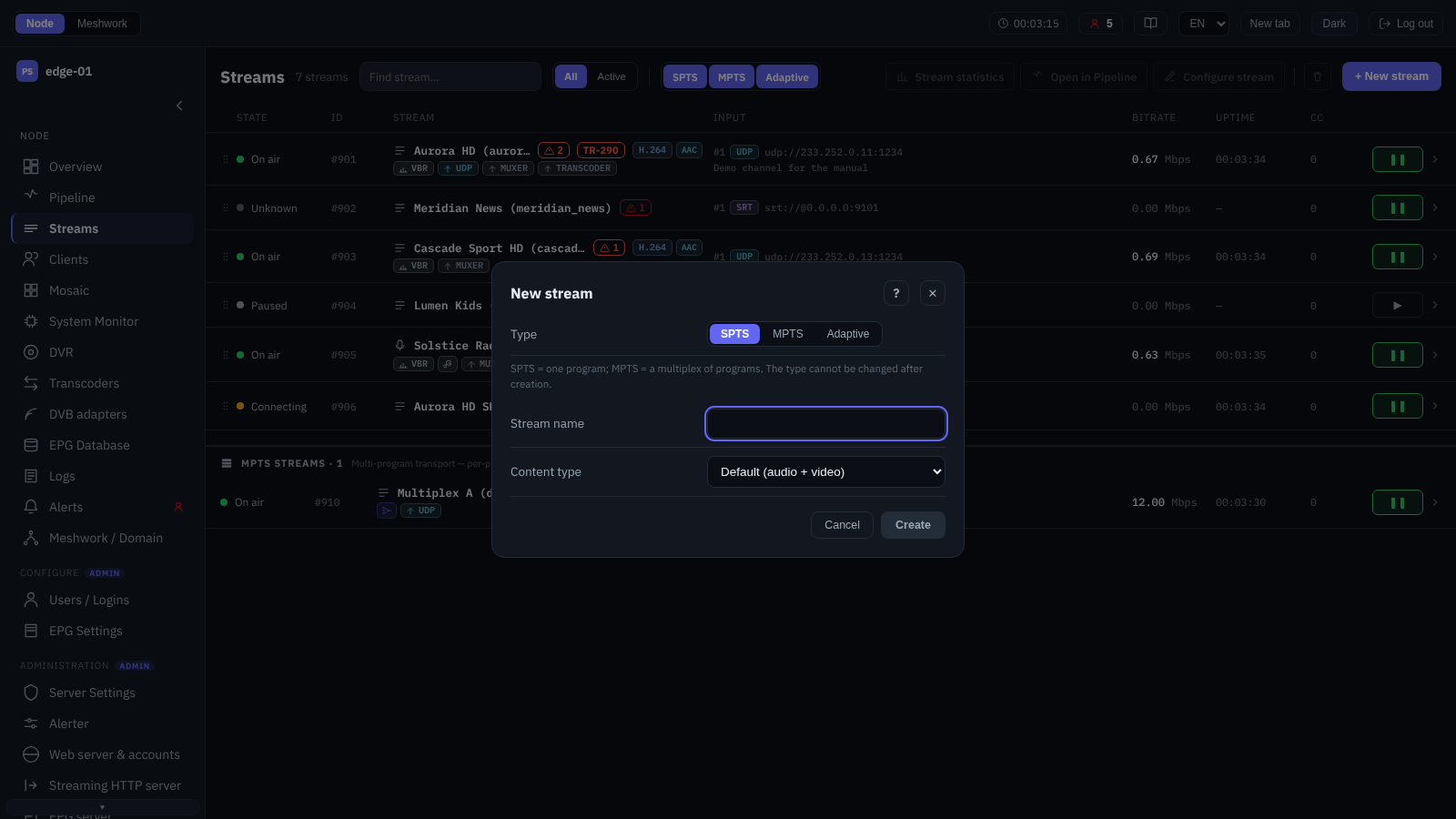
The New stream dialog.
The stream creation window. The type is selected with a switch: a single programme (SPTS), a multiplex (MPTS) or an adaptive bundle (Adaptive); for SPTS the “Content type” is also specified. After an SPTS or MPTS stream is created, the editor opens immediately (Configure stream). No separate editor opens for an adaptive bundle: the members and their bitrates are set directly in this window, because the bundle is built from already configured OTT streams. The differences between SPTS and MPTS are described in SPTS streams and MPTS streams, and adaptive bundles in Adaptive bundles.
Configure stream
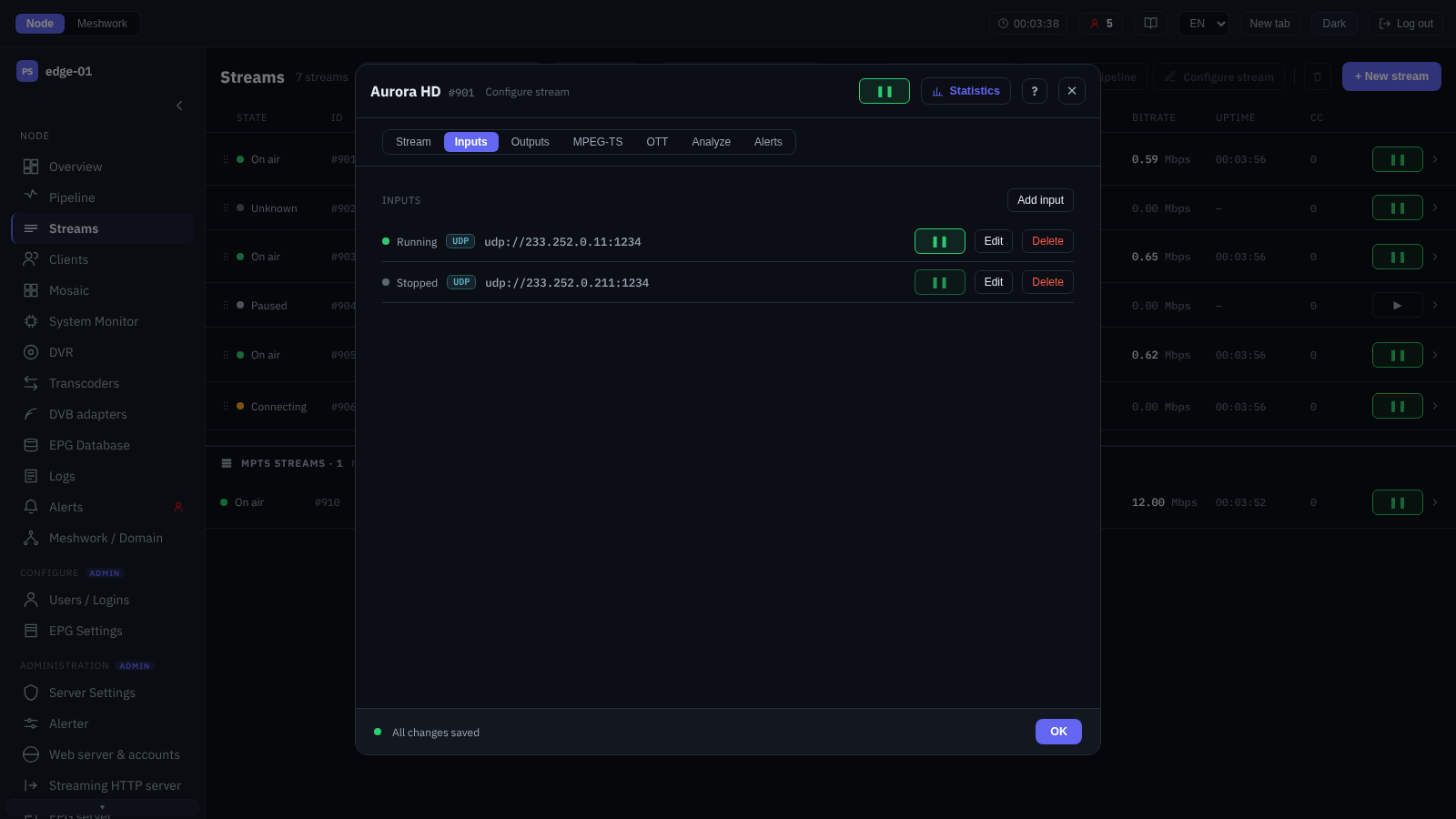
Stream editor, the Inputs tab.
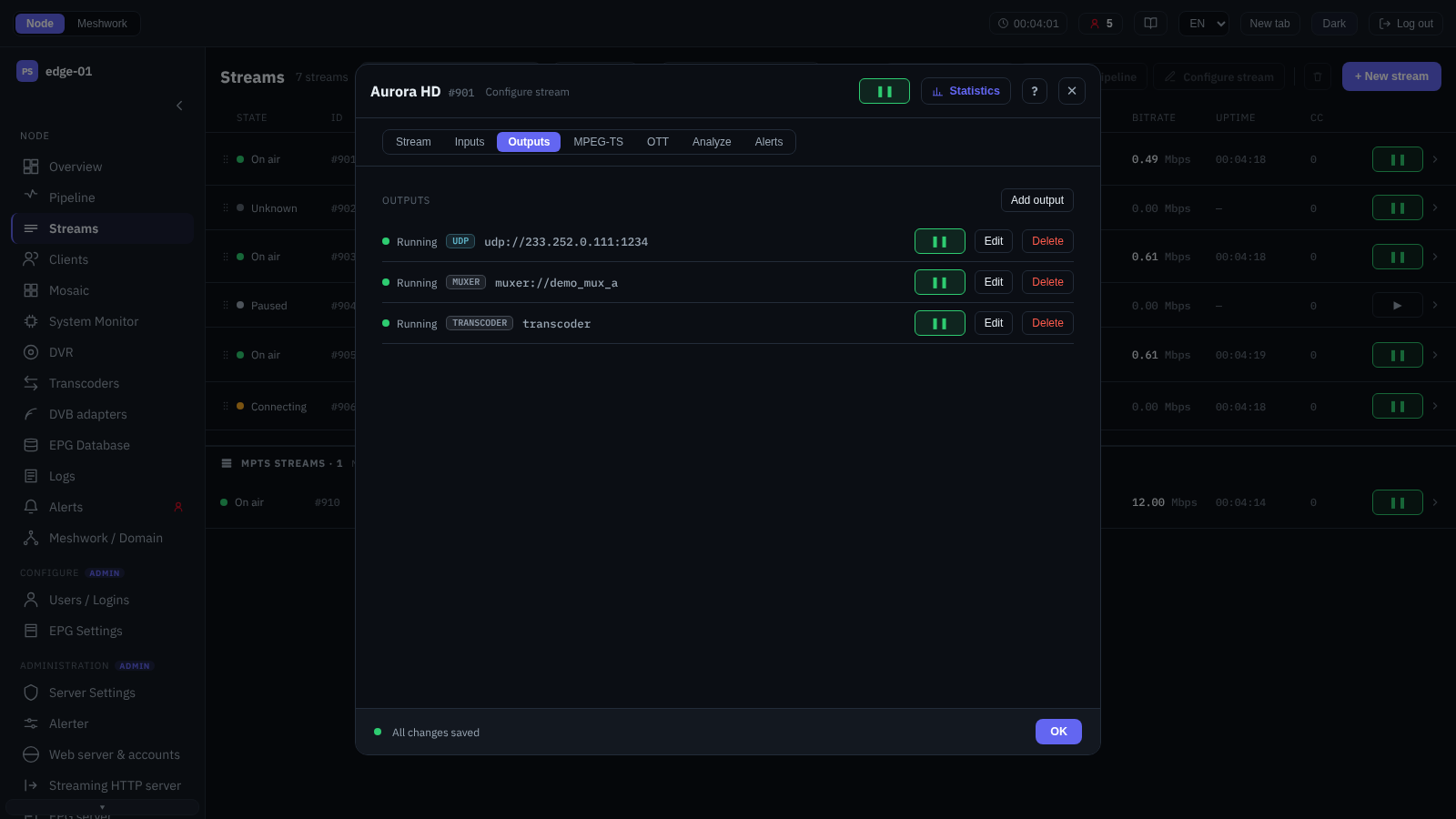
Stream editor, the Outputs tab.
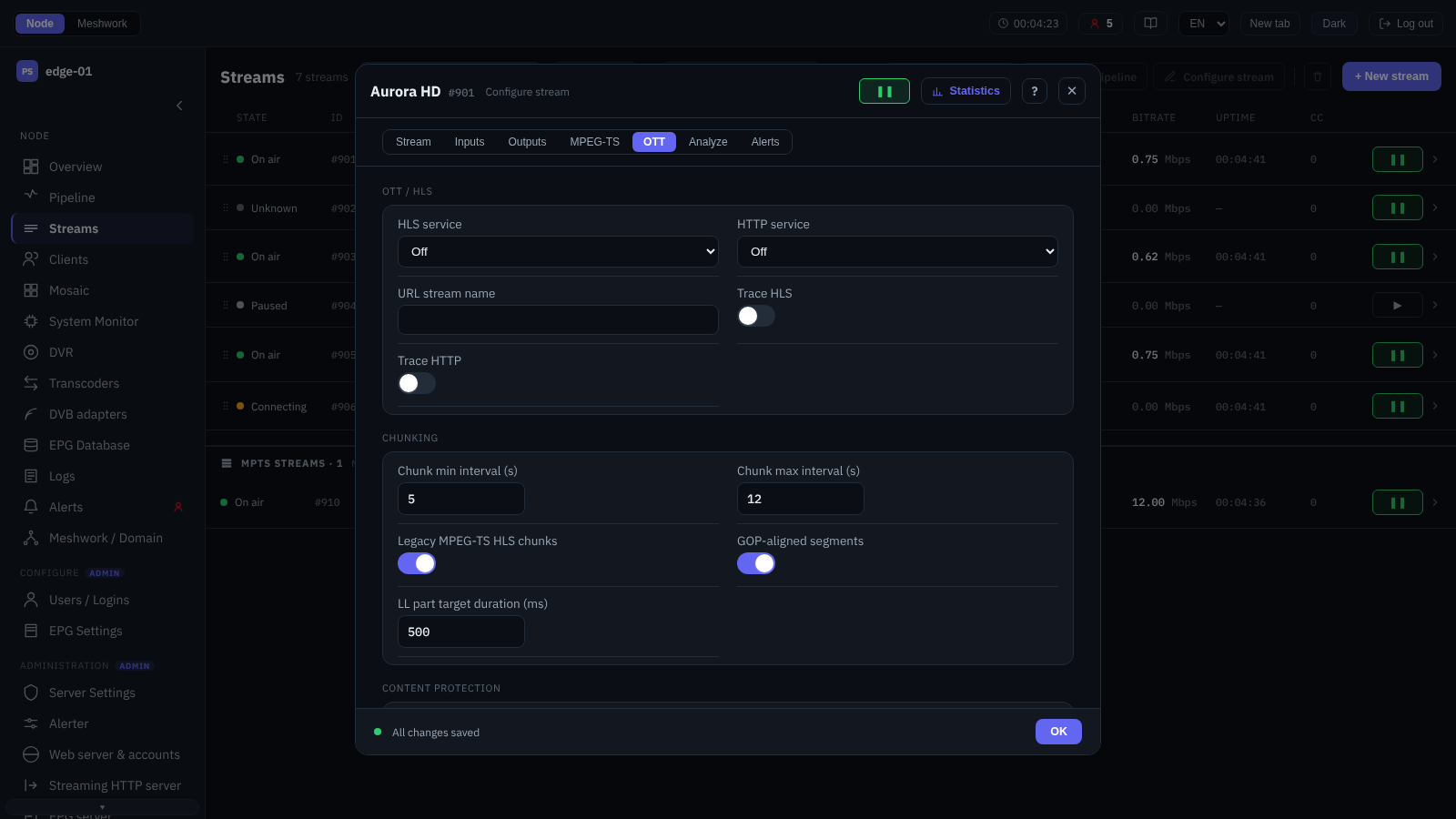
Stream editor, the OTT tab.
The main stream editor. The settings are grouped into tabs; for MPTS streams the “OTT” tab is not shown.
- Stream
Identification (name, display name, the stream type for SPTS, note) and stream behaviour: timeout, check interval, re-check of the main input, mosaic generation (Mosaic), EIT extraction into the EPG database (EPG Database) and the scrambling attribute for SPTS. For SPTS, EIT generation from the selected EPG source and its channel is configured here as well (EIT generator).
- Inputs
The list of the stream’s sources with their priority and redundancy (Source redundancy and distribution). The rows are numbered in order:
#1is the main one, the rest are backups in the same order. The administrator can edit the order here or in the expanded row of the stream list: a row is moved by its handle, and from the keyboard by putting the focus on that handle and pressingAlt+↑orAlt+↓. A hint above the list says the same; it appears when there is more than one input and editing is available. An added input always goes last, so a new source never takes the place of the main one. Adding and editing an input open the input and output editor (Input and output editor); an individual input can be paused. Themuxerinput is offered only in an empty list: in an MPTS stream it is added first, and while it is there, the “Add input” button is disabled with the note “The muxer input must be the only input of the stream.” A multiplexer has no input redundancy. An MPTS stream that receives a ready multiplex over the network does not have this restriction: its inputs are ordinary and have redundancy.- Outputs
Delivery of the stream over the transmission protocols (Peer protocols for reliable transmission) and the standard transports (Other inputs and outputs). Every output is added and edited through the same editor. A stream can have only one
ps1output: when the next output is being added, this type is no longer in the list; the other types can be repeated.- MPEG-TS
The bitrate mode of the output transport stream (Bitrate control) and, for SPTS, also the “Network ID”, a fixed PAT/PMT interval, filtering of the service tables (CAT/ECM/EMM, EIT, NIT, SDT, subtitles, TDT, teletext; MPEG-TS filtering), rewriting of the SDT and of the programme number (Stream modification), as well as automatic PID mapping for the programme and the base PID of its window (Automatic PID arrangement).
Saving any setting on this tab other than “Bitrate mode”, “Padding bitrate” and “Network ID” closes and reopens the stream’s inputs and, on a stream with OTT delivery, also rebuilds the OTT pipeline, so the viewers reconnect; a note on the tab itself warns about this.
- OTT
OTT delivery of the stream, split by delivery plan: the stream name in the URL, shared by the progressive delivery and by HLS/DASH alike; the HLS service (Delivery modes), its tracing and the extraction of teletext subtitles into WebVTT; chunks and low latency (Segmenter); DVR recording to the selected storage (OTT and DVR); the HTTP service with its own tracing; and DRM content protection, HLS AES-128 or CENC (Content protection (DRM)). Subtitles and DVR are configured only in the OTT modes of the HLS service. For SPTS only.
- Analysis
Quality control of the transport stream: verbose tracing, deep analysis of the elementary streams, the TR 101 290 monitor, analysis of PCR/PTS discontinuities and of the T-STD video buffer, synchronisation drift compensation (Analyser).
- Alerts
The general switch for the stream’s alerts and the delay before alerts are raised on errors of its inputs and outputs (Alerts (alerter)); the thresholds are set at the node level (Alerter).
Saving changes that affect a recorded DVR archive is additionally protected by a confirmation (Confirm DVR changes).
If the stream is deleted from the node while its editor is open, the message “This stream no longer exists on the node.” appears at the top of the panel and saving becomes unavailable; the same reason is stated next to the button. The fields remain editable, but there is nowhere to write them: the object is no longer on the node. The message clears by itself if a stream with the same identifier is created again; the same line appears above the processing diagram (Pipeline) if the stream is deleted while the diagram is open. The node has reported this since 2.0.2.302; before that, all the lists of such a stream simply emptied, which looked like a stream with no inputs and outputs configured.
The individual windows of the editor are described below.
Input and output editor
The window for adding and editing a stream input or output. The transport type is selected at creation and cannot be changed afterwards (to change the transport, the input or output is re-created). The interface does not translate the captions of the transport’s own fields: these are technical designations, and in any language they are shown in English. The fields of every transport, with their values, ranges and the differences between input and output, are listed in Input and output fields by transport. The parameters are split across tabs:
- Properties
The address, port, binding to a network interface and the connection parameters of the selected transport. Peer protocols and standard transports are described in Planning and data transmission protocols, and encryption in Stream encryption. For PS1 and SRT inputs, automatic sign-in by Meshwork peer authorisation is available, with the option to switch to a manual login and password. The address can be pasted from the clipboard (“Paste URL”), or a source can be selected from the domain catalogue (“Pick from library…”, Library sources). For a transcoder input, the decoder and the encoding parameters, including the frame resize mode, are set here as well (Transcoders).
- MPEG-TS PID
Selection and remapping of PIDs on an input or an output: PID accept (white-list), PID reject (black-list), remapping of PIDs and of the audio-track language. While automatic PID mapping (Automatic PID arrangement) is enabled for the stream, the PID remapping group is hidden on the inputs and has no effect; the accept and reject lists keep working as before. On the muxer output PID remapping is retained, because it belongs to the multiplexer (PID mapping), but the source PIDs in its pairs become the PIDs assigned by the automatic mapping.
Each number has a label that says what the PID is: on an SPTS, the kind and the codec (
Video · H.264); on a multiplex, also the programme the PID belongs to, before them (01 ПЕРВЫЙ КАНАЛ · Teletext). An MPTS input has no decoded programme of its own: the services are one level below, one per multiplex programme, and all of them appear in the label. The add row has a “Select PID…” list with the PIDs the source actually carries; it fills the number into the field, and manual entry remains, because the transport may carry a PID about which nothing has been decoded. If nothing is known about the source (neither fresh data nor saved), there is no list and only the number field is left; data from elsewhere is not substituted, and a stopped input does not take the programme composition from a working neighbour of the same stream: their source may be a different one, with a different PID plan. In PID remapping the list serves the “From PID” side, since the PID on the right is assigned, not looked up; in language remapping it shows audio PIDs only. On a stopped input the black-list has no labels and no selection list: a stopped input remembers the programme composition as it was after its own filter, and the role left in that snapshot for a rejected PID is a trace, not a fact.- BISS
BISS descrambling keys for a scrambled source: a single key for SPTS or one key per programme (PNR) for MPTS (BISS descrambling).
- CI/CAM
Handing the input over to a separate CI module for descrambling (CI/CAM on a stream input).
CI/CAM on a stream input
The “CI/CAM” tab of the input editor hands the whole transport of the input to a separate CI module: the node pumps the stream into the module and takes it back already descrambled. The list of programmes on the tab states not what goes into the module but what the module has been told to descramble; the whole input goes into the module. The hint below the form says exactly that.
A separate module is not the same as a module welded into the tuner: the welded one is configured on the DVB adapter itself, by the adapter’s own programme (Descrambling), and is not offered on this tab at all. How to tell them apart in the hardware inventory is described in Hardware.
The tab exists on an input only, and only on a node of build 2.0.2.361 or newer; on an older node it is not there at all, not dimmed but absent, without explanation. Among the transports, transcoder and test-stream do not get it, as no transport reaches them from outside, nor do RTMP and RTSP, which do not carry MPEG-TS; the rest have it. The form on the tab depends not on the transport but on the type of stream the input belongs to: an SPTS stream gets a single “CI slot” field, an MPTS stream a stack of cards, each with a “Program (PNR)” and “CI slot” pair. An SPTS stream has no programme controls at all, because that key does not exist for it. In practice DVB and muxer inputs occur only on a multiplex, while HLS, the demultiplexer, RTSP and RTMP occur only on an SPTS stream, so the form with the programmes is reached on MPTS alone.
Cards are added with the “Add program” button below the list and removed with the “Delete program” cross in the corner of the card; neither asks for confirmation. An empty list reads “No program has been handed over to the CI module.”.
CI slot. The list holds “Off” and every separate module the node has reported; each is labelled with the slot identifier, the module name and, if the slot is already taken, a note on who holds it. A taken slot is not removed from the list: two inputs may take one module in turn, and the note here is a warning, not a prohibition. The holder is the node’s own service prefix, of the form [stream][input#1.udp][cam0]; it is printed as it comes, is not translated and is not the name of a stream. If the node reports nothing about CI hardware, the list degenerates into an ordinary text field, so that an identifier set elsewhere stays available for editing.
CI clock (Mbit/s). A single numeric parameter, shown as an “Automatic” checkbox and a field next to it. The checkbox is ticked by default; while it is ticked, the field is locked and shows “Measured from the input”. The automatic mode measures the bitrate of the input and runs the module about a third above it, and it follows the input as it goes, so a source whose bitrate has dropped needs no new value. The clock sets the pace in both directions: far above the input the module returns mostly stuffing and packets are lost; far below it the pipe stalls.
Some checks lock the save button, others only warn:
Condition |
What it does |
Message |
|---|---|---|
The slot identifier is longer than 16 characters |
locks |
“The CI slot identifier must be at most 16 characters.” |
More than four different slots are named (repeats of one do not count) |
locks |
“At most 4 different CI slots. Repeating one slot for several programs is allowed.” |
There is more than one slot and the lists differ in length |
locks |
“If there is more than one slot, state a slot for every program: the lists are matched by position.” — with a “Fix the pairing” button next to it |
The clock is not an integer from 0 to 200 |
locks |
“The node accepts an integer from 0 to 200.” On a node of a version before 2.0.2.409, this is followed by: “On this node a refusal is not rolled back: everything the node read before this field will stay applied.” |
The clock is outside 20…120 Mbit/s |
warns |
the value is applied as given |
The programme number is outside 0…65535 |
nothing |
only a red outline |
The last row of the table describes the only place on the tab where an invalid value reaches the node: there is no message, saving is not locked, and the node will refuse the request. Starting with version 2.0.2.409, a rejected save returns the input to its previous state (How errors arrive); on a node of an earlier version, the fields read before the programme number stay applied, so if a save is refused, reopen the form and check what is in it now.
The “Fix the pairing” button is the tab’s only action besides adding and deleting cards. It extends both lists to the length of the longer one: the programme numbers are padded with zeros, the slots with a repeat of the last one named. A zero here is not a mistake but a deliberate gap: it assigns no programme to the module and keeps a position in the pair. A repeated slot does not create an extra stage. The button discards nothing that has been typed and asks no questions.
One slot serving several programmes is a legitimate and ordinary arrangement; the limit of four applies to different slots only. That is exactly what everything configured before 2.0.2.361 looks like.
If saving is locked because of the CI/CAM tab while the operator is looking at another tab, the line “First fix what is on the CI/CAM tab.” appears above the form. Locking the save here is better than sending it on the off chance: on a node before version 2.0.2.409 a rejected write is not rolled back, so a pairing that fails the end-to-end check would reach the settings file in full, and at the next start-up the loader would switch CI off on this input.
The work of the module is visible in the stream statistics (Stream statistics), and the state of the slots and their release on the “Hardware” screen (Hardware).
Library sources
Selecting an input from the shared resource catalogue of the Meshwork domain: a list of the streams of the same transport already delivered on the domain’s nodes, from which a source can be connected without entering the address by hand. The list is filtered by source node and by text and is split into pages; sources of the same domain in peer protocols are marked with the “peer” attribute (Shared resource catalogue). Not to be confused with the Library — this feed window: here the catalogue is used to pick a source, there to see who else works with an address that has already been set.
Library — this feed
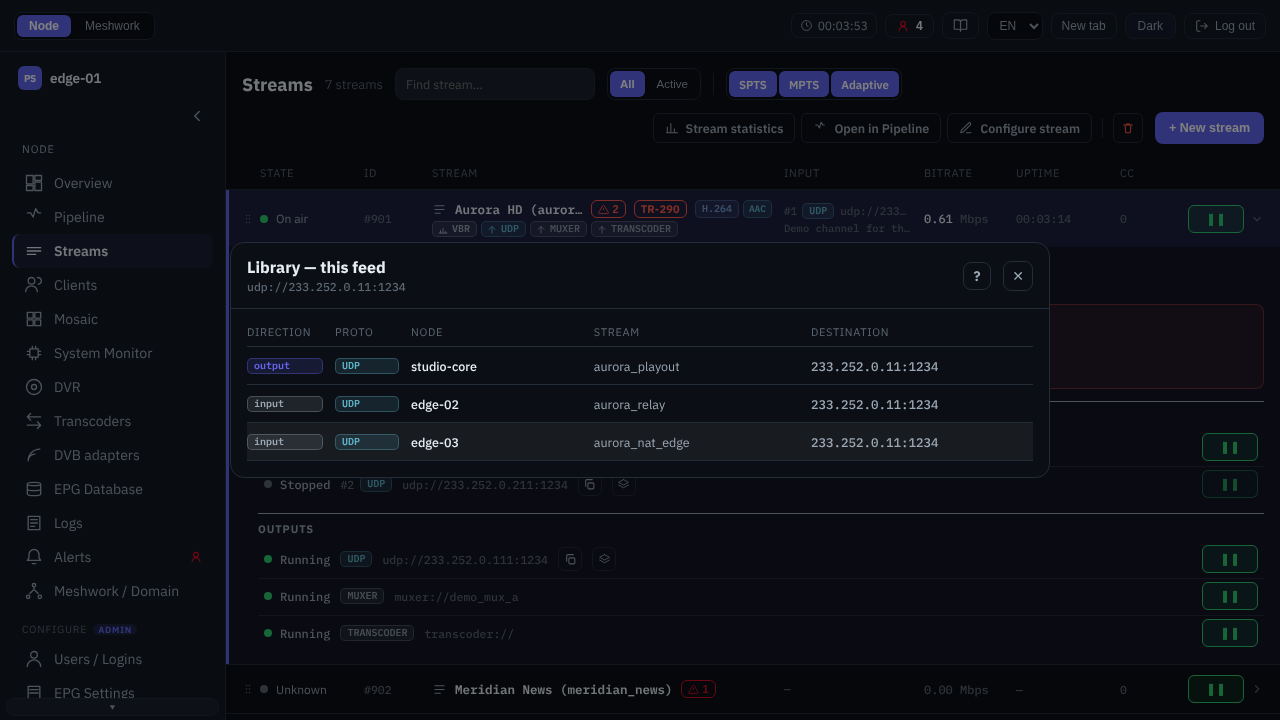
The “Library — this stream” window: for the input of a stream it shows the source (output) and two other consumers (input) of the same address.
The window answers the question “who else works with this address”. It opens from the “Show in library” button next to the address of an input or an output: in the expanded row of the stream list, in the input and output lists of the stream editor, on the input and output cards of the pipeline (Pipeline) and in the statistics window (at the active input and in the “Outputs” section). The subtitle of the window is the address of the point it was opened from.
The button exists only for the transports that get into the shared domain catalogue: UDP, RTP, Pro-MPEG COP3/RTP+FEC (SMPTE 2022-1/2), RIST, PS1 and SRT (Shared resource catalogue). A transcoder, muxer, demuxer, file or test generator input has no entries in the catalogue, and therefore no button either; this is not a sign of a fault.
The window lists the other points of the domain that work with the same address. The stream’s own inputs and outputs, including its backup inputs, are not in the list: the operator sees them anyway. Another stream of the same node listening on the same address, however, is an ordinary neighbour and is shown just like the rest.
The “Direction” column shows the role of the point: output means it delivers this stream (the source), input means it receives it (a consumer); the sources are listed first. The other columns are the same as in the shared catalogue: “Proto”, “Node”, “Stream” and “Destination” (the address and the port). The address is followed by the “verified” mark: the node confirmed this pair through domain authorisation rather than inferring it from matching addresses (when working through NAT, the addresses of the two sides do not match anyway). No more than one row per listening socket gets the mark: the node names a single representative among the confirmed sessions, and it changes as clients connect and disconnect. So a missing mark does not mean that the link is not real.
A click on a row opens the admin UI of its node at the statistics of its stream. A row of the node itself opens in place, a row of a neighbour according to the “Open nodes in” setting of the top bar (Common bar); Ctrl or ⌘ forces a new tab. The row of a node that is unavailable or unknown to the network has no action and shows the “Node unavailable” tooltip.
A match is computed by protocol and by the full address (the group and the port) and, for UDP, RTP, Pro-MPEG and RIST, also by the VLAN and the SSM source. A point on the same group but in a different VLAN or with a different SSM source will therefore not get into the list, and neither will a point of another transport at the same address. For PS1 and SRT no address match is required at all: the calling side names its partner by host name, and that name is matched against the membership of the domain, so the address of a row found this way may look entirely different. The confirmed pair is found the same way, by the node and stream names given by the listening side.
The two messages about the absence of neighbours mean different things:
Message |
What it means |
|---|---|
“There are no other registered endpoints at this address.” |
The endpoint is announced in the catalogue and has no neighbours. |
“This endpoint is not announced in the library (only running network inputs and outputs are announced).” |
There is no entry for the endpoint itself in the catalogue: the stream is not running, the input or output is paused, has only just been started or has been excluded from publication by the Peer private field (Shared resource catalogue). In this case the neighbours are not absent — they are unknown. |
The same catalogue in its entirety is shown by the Library screen.
Programs
The multiplex (MPTS) programme editor, opened from the muxer input configuration window: the programme composition of the output stream, the programme order in the PSI and the PID assignment. A programme is added from among the configured SPTS streams or removed; the order is changed by dragging, and on a narrow screen with the Alt+↑ and Alt+↓ shortcuts (Keyboard operation); an individual programme can be paused. When automatic PID assignment is disabled, the PMT PID and the elementary stream PIDs are edited for each programme; when the composition of a member programme could not be read, the PID editor shows the request error rather than “No media info — the source is not being decoded.”, because a silent source and a failed request call for different actions. Multiplex assembly is described in Multiplexer, the allocation of programmes and PIDs in Programme parameters and PID mapping, and transit and analysis of MPTS streams in MPTS streams.
Confirm DVR changes

The “Confirm DVR changes” window.
A warning before saving stream changes that affect an already recorded DVR archive: disabling the recording, switching to another storage, reducing the retention period or the protected minimum, as well as changing the DRM key of a stream with recording (the previously recorded encrypted segments then become inaccessible). The window lists exactly what will be affected and requires confirmation; safe changes (attaching a storage for the first time, increasing the retention period) are saved without a prompt. Recording and archive retention are described in OTT and DVR and DVR: the stream archive.
Stream statistics
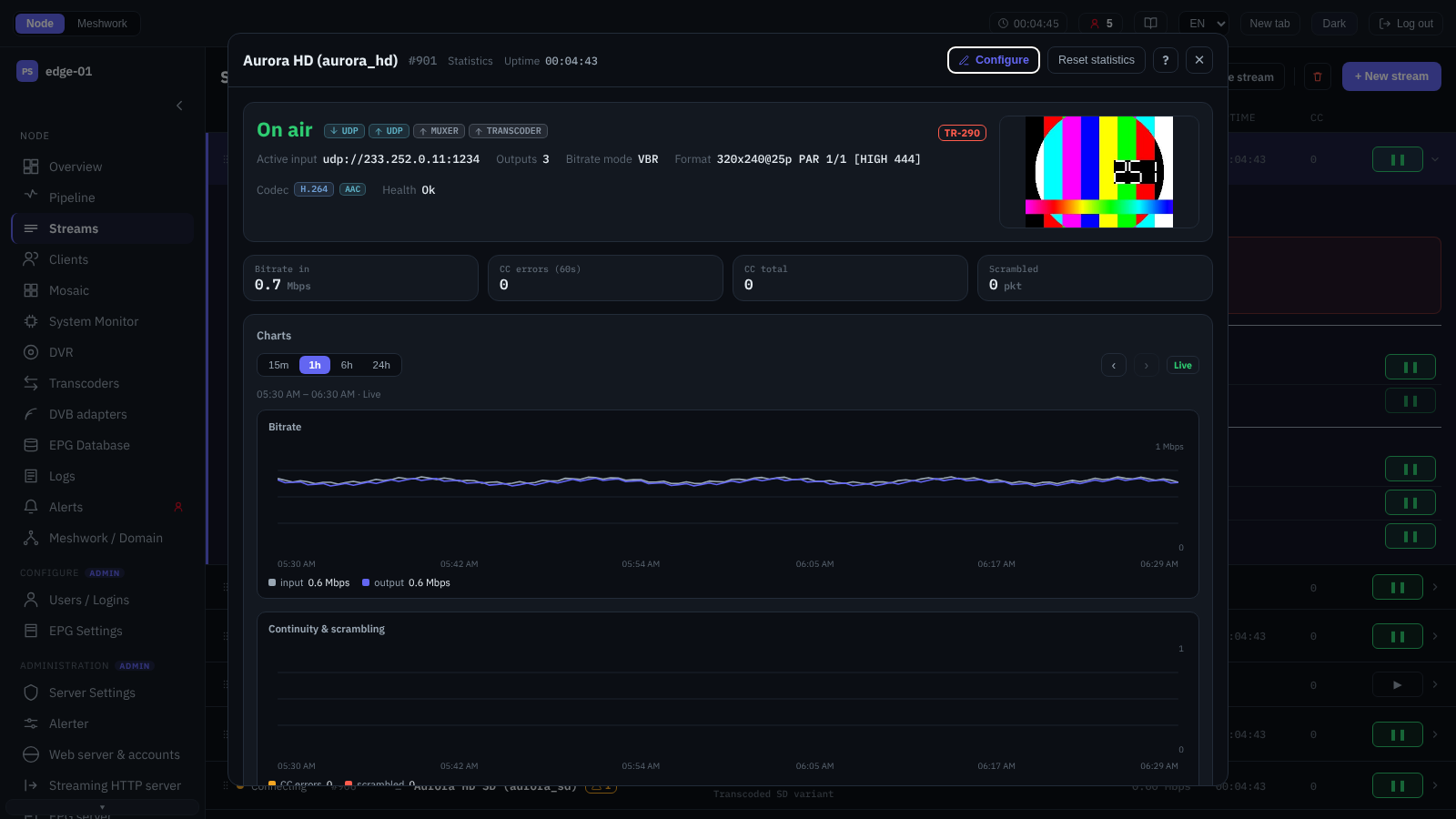
Stream statistics window.
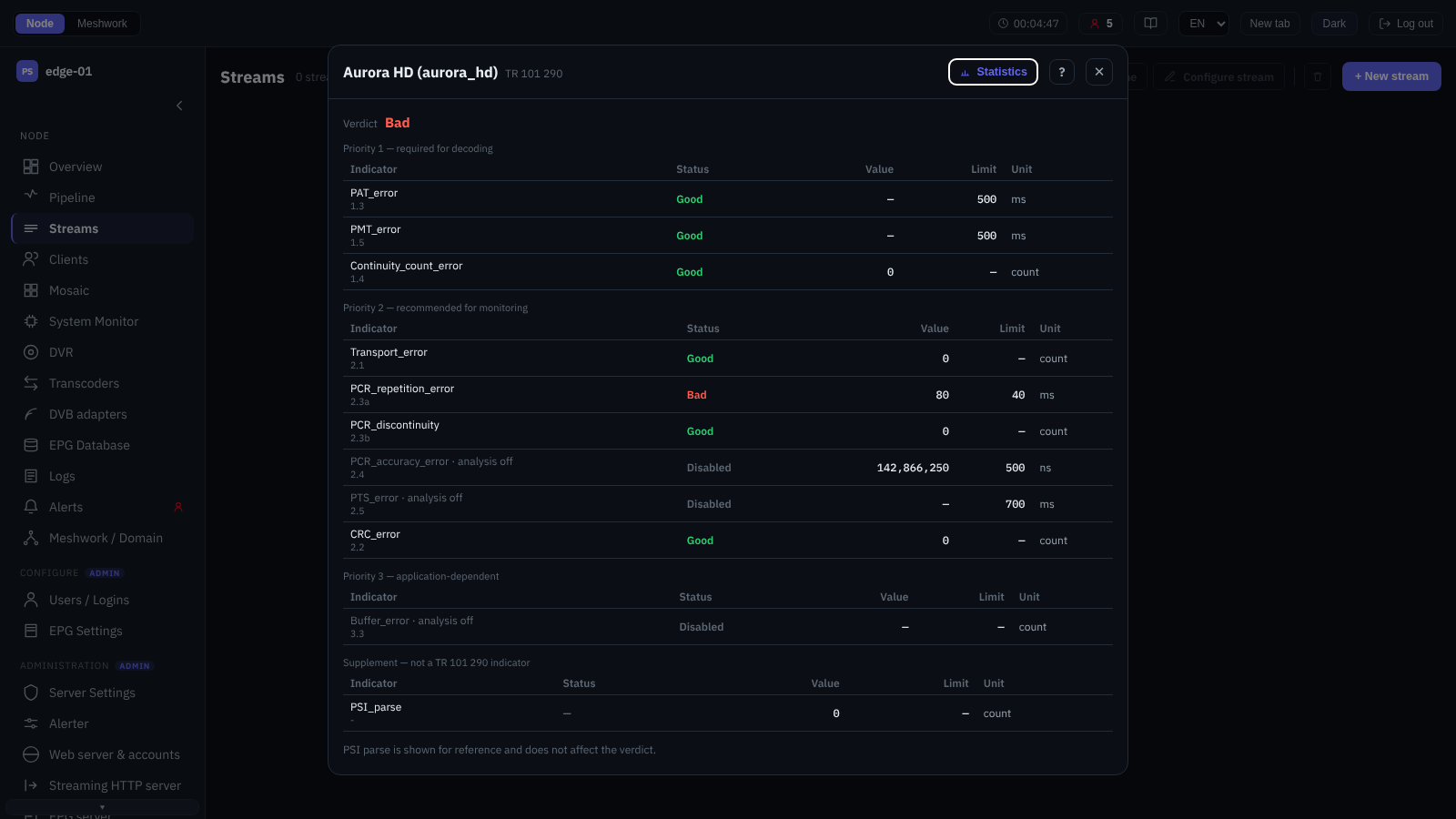
TR 101 290 analysis report.
Detailed stream statistics in a separate window, updated in real time. When opened by a link from another screen, the window also shows this stream in the list behind it (Streams); a link that opens the stream editor instead of the statistics behaves the same way. The sections are:
- State summary
The current state and message of the stream, the attribute badges, the active input and the number of outputs, the bitrate mode, the picture format and codecs, the OTT delivery links and a live frame snapshot (Mosaic). Here are also the TR 101 290 verdict icon that opens the full report, followed during an active violation by the “AI letter” icon (Complaint assistant), and the “Show in library” button at the active input (Library — this feed).
If the active input of the stream is a transcoder input, its value becomes a link: it opens the “Transcoders” screen (Transcoders) with the row of the instance that this input receives the stream from expanded; the active-instance filter is cleared, so a stopped instance is visible too, and that is usually the one such a link is followed for. A “Decoder source” badge appears beside it with the name of the stream that instance decodes; it opens the stream list with the row of that stream expanded (Streams). If the node does not report the name of the source, the badge shows its number, and if there is no source at all, there is no badge. Both links are available in any role: they only show and change nothing.
- Multiplex / KPI
For SPTS, the key counters (input bitrate, CC errors over the window and in total, scrambled packets); for MPTS, the multiplex table with the aggregate rates and the state of the programmes (Per-programme analysis).
For a programme descrambled by a CI module, a “CI” row with the slot number and the module’s verdict appears in the expanded detail (CI/CAM on a stream input). It is a row of the detail, not a column of the table: the columns are as before. On a live multiplex usually one programme in ten has such a row, and the column would be empty for all the rest.
- Charts
Time series: bitrate, continuity and scrambling, PCR jitter, packet loss. The window is picked with the “15m”, “1h”, “6h” and “24h” presets; the arrow buttons
‹and›(the “Older window” and “Newer window” tooltips) move it backwards and forwards, the “Live” badge marks a window that reaches the current moment, and its bounds are shown above the charts. The preset sets the sampling step, but the node does not give out data finer than its own step: on a node with a coarse step the shortest window, “15m”, is built from fewer points and comes out coarser. The other presets are not affected.- MPEG-TS check
A quick check of the structure (TS, PAT, PMT, PCR, audio/video and their ES), the overall TR 101 290 verdict and the programme signalling attributes (Validity check).
- Input diagnostics
Expandable blocks: “Media information”, “Input connection”, BISS descrambling, EIT generation, “Analyzer” (PCR and synchronisation metrics, and below them the PID table of the active input with the “PID”, “Type”, “Bitrate” and “Packets/s” columns), stuffing and “Deep analysis” (the GOP structure, the T-STD buffer, the video codec details, PTS/DTS discontinuities, SCTE-35; Continuous measurements, In-depth analyses). The content of the section depends on the input. On UDP, RTP and Pro-MPEG inputs the “Input connection” block has the “Socket buffer (granted)” line, the useful volume of the receive buffer that the socket actually got (Recommendations for network tuning for multicast). A muxer input has no section at all: it has no socket, and the multiplex table shows the programmes. On network reception of a ready MPTS, “Input connection” with the indicators of its own transport remains, while “Media information”, “Analyzer” and “Deep analysis” are hidden: such an input has no per-programme measurements. BISS descrambling is shown for SPTS only: for MPTS the BISS counters are kept per programme (BISS descrambling). The EIT generation and stuffing blocks appear by themselves when the stream generates EIT or adds NULL packets.
- CI/CAM
The work of the CI modules to which the inputs of this stream have been given (CI/CAM on a stream input). The section is collapsed by default, its header carries the total number of stages, and it appears only when at least one input of the stream names a CI slot.
The section shows all inputs of the stream, not just the active one. A backup input may well be holding the slot, and releasing a slot on the “Hardware” screen exists for exactly this case (Hardware). The blocks of an inactive input are labelled “On input” with the type and the number of that input.
Each stage of the cascade gets its own block; when an input has more than one module, the blocks are headed “Stage 1”, “Stage 2” and so on. The look of a block depends on whether the slot has been taken. A taken one has “State”, “Module”, “Clock” (the one in effect now; while the node does not report it, “automatic” is shown), “Delay”, on pass-through “Passes unchanged”, then the counters, “Verdict” and “Error” with “Module message”. An untaken one (the measurement is still running or the slot could not be taken) has only “State” and the line “The slot has not been taken yet, so there are no counters.” The node gives out almost nothing for such a slot, and a wall of zeros would be misleading. So a zero that is shown all the same means “the slot is taken, but nothing has happened”.
The counters are split into two groups on purpose, because resetting the cumulative statistics clears only the first: “Delay line” (inserted, descrambled, lost, duplicates, mismatches, timeouts, not accepted) is reset, while “Pipe” (given out, returned, group errors, stale, stuffing, write congestion, read timeout, resets) is not; its counters start over when the slot is taken anew.
Read them with two reservations. The verdict
unknown(likereserved) does not mean a failure: many modules do not answer such a query at all and carry on descrambling; judge by the growth of the counter of descrambled packets. And growing losses and group errors usually mean too high a CI clock; a lost packet goes on exactly as it arrived, that is, scrambled.The values that come from the node are printed as they are and are not translated: the slot identifier of the form
0:1, the state (empty,module-present,initializing,ready,error,unavailable,measuring), the name of the module’s application, the verdict, the error text and the module message.- Outputs
Telemetry of every output that is not paused: state, destination, bitrate, counters of the traffic sent and the indicators specific to the transport (PRO-MPEG FEC, PS1, RIST, SRT, RTMP); paused outputs do not appear in this list. Outputs in the transports of the domain’s shared catalogue have a “Show in library” button (Library — this feed). The reason an output failed is shown here the same way as in the expanded row of the list: as a red line while the output is failing right now, and dimmed, “Last failure N ago: …”, when it is stopped. On nodes of earlier builds, which do not report the time of the error, the line is shown without an age, simply “Last failure: …”.
- OTT / DVR
The delivery URL templates, the metrics of the chunk ring and of the DVR archive, the charts of archive coverage and of subtitle replicas (OTT and DVR, Archive playback (VOD)).
- Profiler and Stream log
The load of the processing threads (share of a core) and the structured log of the stream events.
The TR 101 290 report also opens as a separate window; the analyser as a whole is described in Analyser, and the TR 101 290 monitor in TR 101 290 monitor. The administrator can reset the cumulative statistics and erase the DVR archive.
Adaptive bundle
The adaptive bundle (ABR) configuration window: the bundle name and the name in the URL, the member streams and their bitrates (“0” means auto). Only SPTS streams with OTT delivery enabled can be members; they are added and removed directly in the window, and the bitrate is set for every variant. The bundle is published as a single master playlist from which the client selects the quality.
Since version 2.0.2.420, spaces, tabs and line breaks are removed from the “OTT name” field as soon as they are typed or pasted: the name is part of the playback URL and of the playlist export. If a bundle was saved earlier with spaces in its name, the field shows the name as it is, with the warning “This name has spaces. It is saved as “…”.”, which gives the same text without spaces; on saving, the name is written without spaces. The streamer also strips spaces from a bundle’s OTT name — when it is added or changed through the API and when the settings are loaded (with a log entry); the cleaned name reaches the settings file on the next save. If two bundles’ names then coincide, the settings are still loaded, but the second name is not served and a warning is written to the log. This rule does not apply to the OTT name of a regular stream (the “OTT” tab of the stream editor).
Adaptive delivery is described in Adaptive bundles, and DVR recording for OTT in OTT and DVR.
