SPTS streams
SPTS (Single Program Transport Stream) is an MPEG-TS stream carrying a single programme; it is the basic processing unit of Perfect Streamer. The stream type (SPTS or MPTS) is selected at creation time and does not change later. An SPTS stream additionally has a content type (values as shown in the interface): Default (audio + video), Audio only (sound without video, radio channels) or Video only.
Scrambled (encrypted) streams are supported: scrambling is detected automatically, and elementary-stream checks are suspended for that time. The “Scrambled channel” setting declares the stream permanently scrambled and disables auto-detection.
The general requirements for the input stream are listed in Input stream requirements; the reception and transmission protocols are covered in Planning and data transmission protocols. Multiplex processing is described in MPTS streams. Streams are created and configured in the web interface (Streams).
Processing pipeline
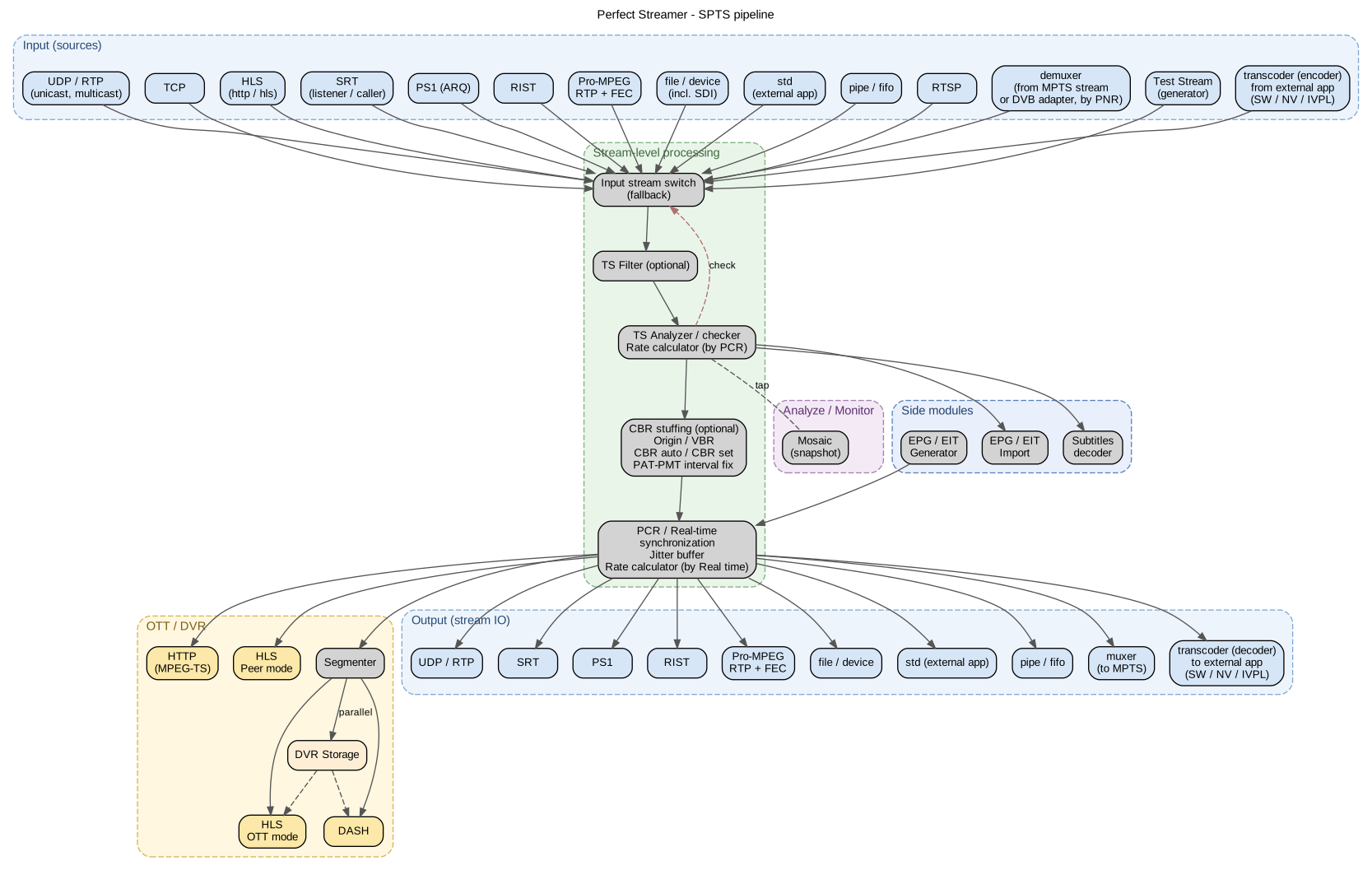
SPTS stream pipeline: inputs, stream-level processing (input switch, TS filter, analyser, bitrate shaping, synchroniser), the OTT / DVR subsystem and outputs.
All inputs of a stream converge on the input switch, after which the stream passes through the successive processing stages:
Input switch — selects the active source and switches the stream to a backup on failure (Source redundancy).
TS filter — optional MPEG-TS filtering and modification (MPEG-TS filtering, Stream modification).
Analyser — continuous validity checking and measurement of the stream (Analyser); it is the analyser verdict on which the input switch declares a source failed. Analyser data is also used by the mosaic (Mosaic, disabled by the “Generate mosaic” setting), by EPG import and by the subtitle decoder.
Bitrate shaping — optional stuffing to a constant bitrate and PAT/PMT interval correction (Bitrate control).
Synchroniser — packet output paced by PCR with network-jitter compensation (Synchronisation). This is also where the EIT generator inserts the programme-guide tables (EIT generator).
From the synchroniser output the stream is distributed to all outputs: transport protocols (Peer protocols for reliable transmission), file recording, the MPTS multiplexer (Multiplexer), the transcoder (Transcoders), and the OTT / DVR subsystem (OTT and DVR). An SPTS stream may also be sourced from an individual programme of a multiplex — a demultiplexer input (type demuxer) extracts it from an MPTS stream or from a DVB receiver by programme number (Demultiplexer).
Source redundancy
A stream may have several inputs, but only one of them is ever active. The order of the inputs in the list defines their priority: the first is the primary input, the rest are backups. If the active input is declared failed, the stream switches to the next input in the list; after the last input the search wraps around to the first. An input that has been paused is skipped when switching.
The number an input is labelled with everywhere (in the stream list, in the expanded row, in the stream editor and in the text of an alert) is precisely its place in the list: #1 is the main one, then the backups in order. The stored priority value may differ from that number: when it saves the settings, the node does not renumber the priorities, and in a file edited by hand the values may be zeros, sparse or repeated (The pss.json settings file). Inputs with the same value stay in the order in which they are written, and that order is kept through later edits.
Failure is determined by the analyser: an input is considered failed if the stream does not pass the validity check or if no data arrives for longer than the configured timeout. Operation of the stream on a backup input is recorded by an alert (Alerts (alerter)).
The input the stream left is stopped but keeps the reason it was abandoned for: the interface shows it as a dimmed line with an age, not as a current failure, and the alert about that input’s error is cleared. If, however, the input parked itself and is waiting for administrator intervention, its alert stays active after the switchover as well. “Stopped” together with “Last failure …” under a backup input of a healthy stream is a normal state, not a fault. Such a line stays for a long time under an input that stands below the active one in the list: the stream does not return to it by itself. An input above the active one is rechecked at the check interval (see “Recheck the main input” below), and after the next check the line under it is refreshed or disappears. The reason on the line is the input’s own, transport-level one (Input data timeout (30 sec), an authorisation refusal, a rejected connection), if the input managed to report it itself; an input declared faulty by the validity check reports nothing on its own, and the line will carry the general wording about a timeout that fired and a move to a backup.
The switching settings are on the “Stream” tab of the stream editor (Configure stream):
- “Stream timeout (s)”
The time without a valid input stream after which the switch to the next input is performed. 30 seconds by default.
- “Check interval (s)”
The period at which the sources are re-probed. 60 seconds by default.
- “Re-probe primary input”
While the stream is running on a backup input, the inputs higher in the list are re-probed at the check interval. As soon as a higher-priority source becomes valid again, the stream returns to it. Enabled by default.
MPEG-TS filtering
By default the stream is passed through as is. Filtering is applied at two levels: the PID rules per input, and the table filters at stream level.
The PID rules are configured on the “MPEG-TS PID” tab of the input window (Input and output editor):
- “Accept PIDs (white-list)”
The list of permitted PIDs. If the list is empty, everything is permitted except what the black-list forbids.
- “Reject PIDs (black-list)”
The list of forbidden PIDs. A PID present in both lists at once is rejected.
After filtering, the PMT is regenerated from the actual set of elementary streams. The PID rules are applied before automatic PID arrangement (Automatic PID arrangement), if it is enabled.
The stream-level filters are on the “MPEG-TS” tab of the stream editor, section “Filters” (all disabled by default):
- “Clean unnecessary tables”
Removes service data not belonging to the programme and elementary streams of unknown types; streams of known types (video, audio, teletext, subtitles) and the PAT/PMT tables are retained. Individual tables (SDT, EIT, NIT, TDT, CAT) are controlled by their own filters.
- “Delete CAT / ECM / EMM”
Removes conditional-access system (CAS) tables and messages, including the CA descriptors in the PMT — for example, to clear the CAS residue left after descrambling.
- “Delete EIT”
Removes the programme-guide tables of the source. By default the EIT passes through.
- “Delete NIT”, “Delete TDT”
Remove the network and time-stamp tables of the source.
- “Delete teletext”, “Delete subtitles”
Remove the teletext and DVB subtitle streams together with their entries in the PMT.
- “Delete origin SDT” (section “SDT”)
Removes the service description table of the source — for example, when the stream is passed on for further multiplexing. When a service name of your own is assigned (Stream modification), the original SDT is replaced automatically and this filter does not have to be enabled separately.
Note
Removing the mandatory tables (SDT, NIT, TDT, EIT, CAT) violates the TR 101 290 requirements for their presence in the stream — this is a deliberate decision of the operator, appropriate for example when the stream is passed on for further multiplexing. In addition, any filtering changes the packet composition of the stream; for the effect on PCR accuracy see Bitrate control.
Stream modification
Custom service data is set in the “SDT” section of the “MPEG-TS” tab. Table generation is enabled by the “Service name” field (and also by active EIT generation from EPG): if the source has no SDT, the table is generated; if it has one, it is replaced by the generated table. The “Provider name” and “Language” fields populate the corresponding fields of the generated table. The “Network id” setting specifies the network identifier for the generated EIT tables when the source does not report a network identifier of its own; if the source does carry one, that identifier is used.
The programme number is remapped in the “Programme number” section: enable “Change programme number” and set “New programme number”. The PAT and PMT are regenerated with the new number; the SDT and EIT are regenerated as well.
“Fix PAT/PMT interval” regenerates the PAT/PMT and inserts them at an interval compliant with TR 101 290. Use it with sources whose tables are infrequent or irregular.
“Fix the PCR reference in the PMT” — repairs a table that declares no usable PCR reference: either PCR_PID is set to 0x1FFF (“no PCR”) or it points to a PID on which no PCR is carried. The node finds the PID the PCR actually runs on and declares that one in the PMT. The first table is held back for up to two seconds while the detection runs, and goes out unchanged if no suitable PID was found in that time. Only the declaration is fixed: the PCR itself remains mandatory, and a stream that has none at all will still not come up. The setting forcibly enables the MPEG-TS filter with the same consequence as automatic PID arrangement: PIDs not declared in the PMT and the CAT stop being carried. On the inputs of the transcoder and of the test stream the setting has no effect, as they do not apply MPEG-TS parameters.
PIDs and languages are remapped on the input, on the “MPEG-TS PID” tab of the input window:
- “Remap PIDs”
“From PID” / “To PID” pairs — replacement of the elementary-stream identifiers, for example to bring the stream in line with the network PID plan. When automatic PID arrangement (Automatic PID arrangement) is enabled, these pairs have no effect.
- “Remap audio language”
“Audio PID” / “New language” pairs — replacement of the audio track language in the PMT.
EIT generation from an external EPG source is enabled in the “Generate EIT from EPG” section of the “Stream” tab: select the “EPG source” and the “EPG channel”, and EIT tables carrying the programme guide are inserted into the stream (EIT generator). The reverse operation is the “Extract EIT to EPG database” setting, which exports the programme guide from the stream into the EPG database of the node (EPG/XMLTV import).
Inputs that receive a raw transport stream support software BISS descrambling: a BISS-1 or BISS-E key is set on the input, and the stream is descrambled before analysis and further processing. Reception of scrambled services from a DVB receiver (CAM, BISS at adapter level) is described in DVB receiver.
Automatic PID arrangement
By default the elementary-stream identifiers pass from the source to the output stream unchanged, so when the stream switches to a backup input the PID arrangement at the output follows the source. Automatic arrangement assigns the PIDs itself, by the same rule for every input: the PID plan of the output stream stays unchanged no matter which source is currently active.
The mode is available for SPTS only and is enabled in the “MPEG-TS” section of the “MPEG-TS” tab of the stream editor:
- “Automatic PID arrangement”
Enables the mode.
- “Base PID”
The first PID of the window: from 32 to 8127, 32 by default. The lower bound puts the window outside the range reserved for the PSI/SI tables, the upper bound keeps the whole window below the PID of the null packets.
The programme is renumbered into a window of 64 PIDs that starts at the base PID:
PID |
Purpose |
|---|---|
base |
PMT |
base + 1 |
video |
next |
audio tracks |
next |
the remaining elementary streams: teletext, DVB subtitles, data, SCTE-35 |
next |
PCR, if it is not carried in one of the streams listed above |
next |
ECM: first from the programme-level descriptors, then from the descriptors of the individual streams |
from the end of the window downwards |
EMM |
Within each group the order of the original PMT is preserved. If the programme has no video, the arrangement is compacted: the first audio track follows the PMT directly. The EMM are allocated from the end of the window: the CAT is parsed independently of the PMT and may arrive earlier, so their addresses must not depend on the number of elementary streams.
The PAT, PMT and CAT are rebuilt for the new arrangement. The SDT, NIT, EIT and TDT are left unchanged: they contain no PID references.
What to keep in mind when enabling the mode:
The mode forcibly enables MPEG-TS filtering, so PIDs that are not declared in the PMT and the CAT no longer pass through. A stream that relied on undeclared PIDs being carried through will lose them.
Manual PID remapping on the inputs has no effect and is ignored, with a warning written to the log. The web interface hides those fields while the mode is on; the saved pairs are not lost and come back when it is switched off.
The PID accept and reject lists keep working and are applied before the renumbering: only the surviving elementary streams get a slot, and no gaps are left in the window (MPEG-TS filtering).
The mode does not apply to the transcoder input (Transcoders) or the test-generator input (Test streams): there the PID plan is built by the encoder or the generator, so their own PMT PID fields remain available.
If the programme does not fit into the window, no renumbering is performed at all — the arrangement stays as it was and a warning goes to the log; a half-renumbered stream is never emitted.
A change to either of the two settings is applied on the fly: the stream itself is not restarted, but its inputs and outputs are brought back up, and resynchronisation takes a few seconds.
In the stream statistics the “Media information — source” block shows the PIDs that arrived at the input, while “Media information — result” and the per-PID bitrate table show the assigned ones; with the mode enabled a discrepancy between them is normal.
Automatic PID arrangement is unrelated to PID assignment in the MPTS multiplexer (PID mapping) — that is a separate setting of the muxer input.
Bitrate control
The bitrate control mode is set by the “Bitrate mode” field on the “MPEG-TS” tab (values as shown in the interface):
- Original (default)
The stream is passed through unchanged; the source PCR stamps are not recalculated.
- VBR
Removes the NULL packets of the source, which minimises the bitrate. Suitable when the stream is used for OTT delivery or transit only. The PCR stamps are not recalculated in this mode, so TR 101 290 PCR accuracy at the output is not guaranteed.
- CBR (auto stuffing)
Levels the bitrate to a constant value by inserting NULL packets (stuffing). The target bitrate is determined automatically: it is fixed a few seconds after the mode is enabled, is raised on a sustained overshoot and is lowered gradually if the content peak stays below the target for a long time. A change of target does not interrupt stream output.
- CBR (explicit stuffing)
The same, but the target bitrate is set explicitly by the “Stuffing bitrate (kbps)” field. Set the value with a margin above the actual content bitrate.
In the CBR modes the PCR stamps are recalculated from the bytes actually transmitted, so the output meets the TR 101 290 requirements for PCR accuracy. In addition, while stuffing is active the PCR repetition rate at the output is kept within specification even on long video frames. In this case the analyser measures exactly the emitted, levelled stream (Analyser).
When CBR is required. Any operation that inserts or removes packets (the table and PID filters, SDT and EIT generation, PAT/PMT interval correction, a change of the programme number, and the VBR mode itself) shifts the position of the content relative to its PCR stamps. If the receiver of the stream requires TR 101 290 compliance, for DVB broadcasting for example, enable a CBR mode: stuffing masks these changes by recalculating the PCR. For a stream downstream of the transcoder, enable a CBR mode on the receiving stream (PCR and the bitrate of the output stream).
The current stuffing state (the target bitrate and the NULL-packet insertion rate) is shown in the data of the active input on the stream page (Streams, section “Stuffing”; the section is visible only while stuffing is active).
Synchronisation
The synchroniser emits packets to the outputs at the pace of the source PCR stamps, so valid PCR is mandatory for the input stream. Between reception and output the stream is delayed in a jitter buffer, which smooths out the irregular arrival of packets from the network.
The buffer is configured separately on each input (input window, Input and output editor; advanced settings, names as shown in the interface):
- Auto jitter buffer
Automatic selection of the delay according to the input type: TCP and HLS inputs use an enlarged buffer, all others the standard one. Enabled by default.
- Jitter buffer (ms)
The buffer size set manually, when the automatic mode is disabled (500 ms by default). Increase the value if the buffer runs empty regularly on an unstable network.
- Auto PCR discontinuity window
Automatic selection of the window for an acceptable PCR jump: 400 ms on the input of an SPTS stream and 1000 ms on the input of an MPTS stream. Enabled by default; a value set by hand is still accepted and stored but has no effect, and the node warns about this in the log when the input is opened.
- PCR discontinuity window (ms)
The window set by hand, when the automatic selection is off (1000 ms by default).
The node waits out a PCR jump inside the window, so on a source with splices, ad insertion or a playout loop a wide window adds that wait to the synchronisation queue for good. That is why the automatic selection takes 400 ms for SPTS: exactly what the rarest permissible rate of PCR stamps requires (ISO/IEC 13818-1 allows 100 ms between them). A jump beyond the window means a break of the source timeline, and the node carries it through without loss where it can: a forward jump is picked up at a new reference point right in the output, what has accumulated is played out, and the recipient sees a single clock mismatch, the same one the source had. Content is lost on a backward PCR step caught during the output: it cannot be re-hooked across, the synchronisation buffer is discarded, the output is broken, and a transcoder reading this input restarts. The node counts the two outcomes separately and raises different alerts for them (Alert code catalogue).
A slow divergence between the source PCR pace and the node clock is eliminated by the drift compensator: the correction is applied smoothly, in micro-shifts, without a hard resynchronisation and without interrupting the output. The compensator is configured on the “Analyze” tab of the stream editor: “Sync drift compensation” (enabled by default) and “Sync drift soft window (ms)”, the dead zone within which no correction is applied (500 ms by default). Hard resynchronisation remains the fallback mechanism for genuine stream discontinuities.
The compensator pulls a delay back only as far as the soft window, and a buffer that has once run dry does not refill by itself, so an input that has survived a stall of its source may carry on with an almost empty queue and pass every subsequent hiccup on to the outputs. The node leaves that state by itself: if compensation is working and the queue stays below a quarter of the buffer set for longer than ten seconds, the output is stopped once and resumes already filled. The output then has one break roughly the length of the buffer; such a rebuild repeats no more than once a minute. The number of such rebuilds is reported by the stream statistics API (Connecting external monitoring systems): a single value is the trace of a one-off dip of the source, a growing one means the source does not hold up to the delay set.
