Transcoders
Transcoders re-encode the video and the audio of a stream: they lower the bitrate for OTT or for a multiplex, change the codec and the resolution, and prepare the renditions of adaptive bundles. Each transcoder runs as a separate node process; the “one-to-many” arrangement is supported — a single decoder can feed several output streams with different encoding settings. Transcoding is available for SPTS streams only; the source stream must contain both video and audio.
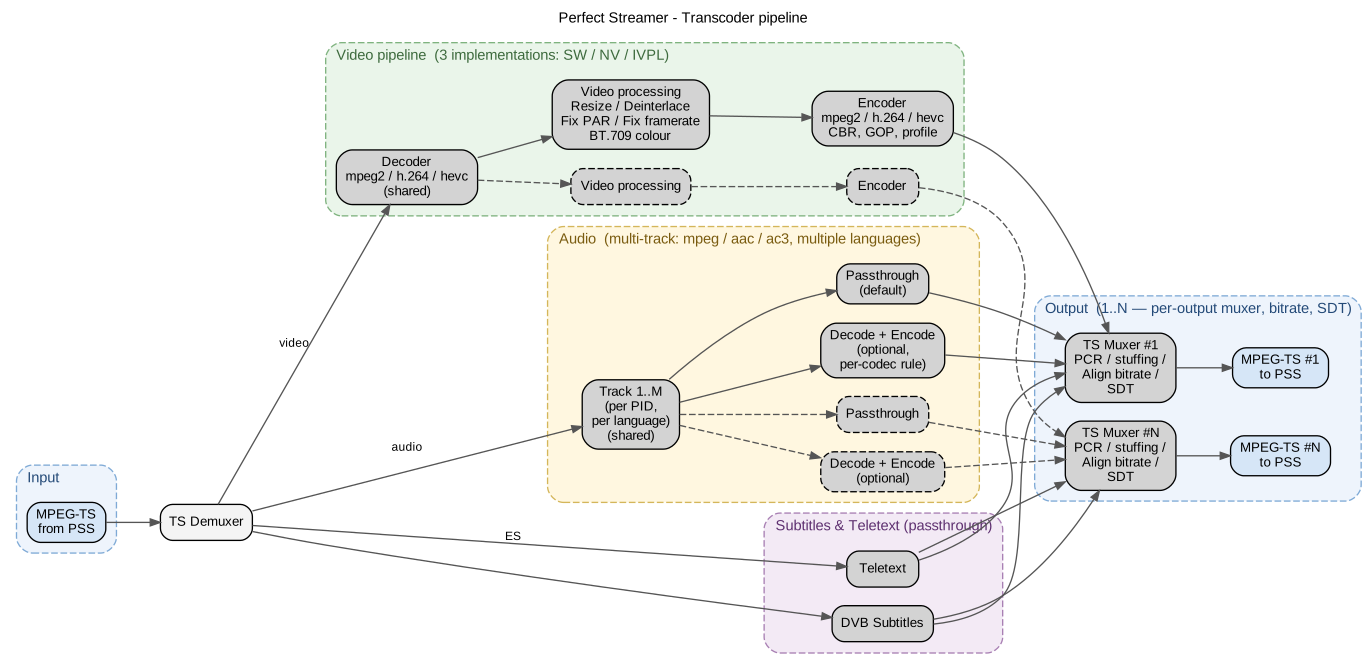
Transcoder architecture: one decoder (shared) and N independent “processing + encoder” branches; the audio tracks are processed separately from the video, subtitles and teletext pass through.
Connection
A transcoder connects two or more streams:
On the source stream an output of type transcoder is added — this is the decoder. Its settings select the transcoding backend (see below).
On the resulting stream an input of type transcoder is added — this is the encoder. Its settings select the running source decoder (the Decoder field).
Step 2 is repeated for every additional rendition — all of them use the shared decoder.
From that point on the resulting stream works as an ordinary SPTS stream: it can be delivered over OTT, recorded to DVR, or fed to a multiplexer.
Backends and codecs
The backend is selected on the decoder (the Transcoder backend field; the values are given as in the interface):
- Video pass-through
The video passes through without re-encoding; only the audio is transcoded. This mode runs on the software transcoder, so the software transcoding package must be installed (Transcoders).
- Software (CPU)
Software transcoding on the CPU.
- NVidia (GPU)
Hardware transcoding on NVIDIA GPUs.
- Intel VPL (GPU)
Hardware transcoding on Intel GPUs.
For the GPU backends the device is selected with the GPU device selector field (an advanced setting). This is needed on servers with several cards. The transcoder packages are installed separately (Transcoders); the installed backends, their versions and the detected devices are shown on the “About” screen (About).
The decoder accepts MPEG-2, H.264 and HEVC video and MPEG (Layer 1–3), AAC and AC-3 audio. The encoder outputs H.264 and HEVC video (the NVIDIA encoder does not support MPEG-2; MPEG-2 is encoded by the Software and Intel VPL backends) and MPEG Layer II and AAC audio.
Decoder specifics:
interlaced (interlace) streams are supported both on the input and on the output; for H.264 and HEVC the interlace alternate format (separate fields) is converted to interleaved;
for HEVC the Main10 profile with BT.709 (SDR) and BT.2020 (HDR) is supported; the HEVC encoder always uses the Main profile with BT.709;
a variable frame rate (VFR) is converted to a constant one;
streams without IDR frames are supported.
Decoder settings
They are set on the output of type transcoder of the source stream (the names are given as in the interface; all the settings listed below are advanced):
- Fix PAR (N/D), Fix frame rate (N/D)
Hints for correcting the data of the input stream: they do not transform the stream but correct the parameters when the source does not report them or reports them incorrectly. Fix PAR — the pixel aspect ratio as a fraction (for example, 16/9 for Wide SD); Fix frame rate — the frame rate as a fraction, if it is absent from the stream (PAL — 25/1, NTSC — 30000/1001, film — 24/1).
- Convert to BT.709
Conversion of the SD colour formats (BT.470-2 PAL, SMPTE 170M NTSC) to BT.709.
- Watchdog timeout
The watchdog restart timeout of the transcoder process.
The transcoder process always keeps a detailed log; a separate trace setting is not needed (Monitoring). The log is kept only in the memory of the node; how to save it for analysis is described in Transcoder logs.
Encoder settings
They are set on the input of type transcoder of the resulting stream:
- Encoder
The video codec: MPEG-2, H.264 (default) or HEVC.
- Video profile (H.264)
The H.264 encoding profile: Main or High.
- Video rate control
The video bitrate control mode: a constant rate — CBR (constant); variable with an average bitrate — VBR (average bitrate); variable with a ceiling — VBR (maximum bitrate). The default is a constant rate.
In both variable modes the encoder stops padding its own elementary stream, so bandwidth is saved only where the receiving stream does not level the bitrate back up: the padding is set by the “Bitrate mode” field on the “MPEG-TS” tab of that stream (Bitrate control). Do not confuse the two fields: “Bitrate mode” concerns the transport stream as a whole, Video rate control only the video encoder.
The mode appeared in 2.0.2.334. On a node of an earlier build the field is absent, and a transcoder of an earlier build does not read it and always encodes at a constant rate.
- Video bitrate (kbps)
The video bitrate is one number for all three modes; what it means is set by Video rate control, and the field label changes with the mode. At a constant rate the number is both the target and the buffer ceiling. At an average bitrate the number is the average rate, while peaks reach one and a half times it. At a ceiling the number is the upper bound the video does not cross, and the average rate comes to two thirds of it. In every case the encoder derives the second limit itself from a fixed peak-to-average ratio of 1.5, so the maximum is not set by a field of its own. The total bitrate of the stream will be higher because of the audio tracks.
- Resize
Resizing of the picture: proportional downscaling by a factor of 2 or 4; conversion to SD — the SD, SD PAL and SD NTSC options, all with the 16:9 widescreen aspect ratio; upscaling of SD to HD; setting the width or the height (the other side is recalculated proportionally). An arbitrary size is not supported: it would distort the aspect ratio.
- Deinterlace
Conversion of interlaced video to progressive (enabled by default; applied automatically when SD is upscaled to HD).
Quality and stream structure settings (advanced settings):
- GOP interval
The keyframe interval, in frames. The default is 25, that is, one second for 25p. This interval is recommended when players join the stream at an arbitrary moment.
- B-frames, Lookahead
They improve the encoding quality; the recommended values are 3 and 20–50 frames respectively.
- Speed preset
The encoding speed preset, from 1 to 7; the lower the value, the higher the quality and the higher the load. The default is 4.
- Frame rate resample
Decimation of the frame rate by a factor of 2 or 4.
- Encoder PMT PID, PAT/PMT interval (90kHz)
The PID of the PMT table and the repetition interval of the PAT/PMT tables in the output stream; they are set when the stream has to fit the network plan.
Saving any encoder setting restarts the transcoder process. A note above the list of fields warns about this. The restart reopens every input that receives data from this transcoder instance, including the inputs of other streams: every transcoded output will have a short break, and a stream with backup inputs may move to a backup for that time (Source redundancy and distribution).
An incompatible combination of parameters can be set; the errors are visible in the transcoder log (Monitoring).
Logo overlay
Since version 2.0.2.413 a logo from a PNG file can be overlaid on the picture of an output stream. The logo is drawn by the NVidia (GPU) backend and, since version 2.0.2.415, by the software (CPU) backend; the Intel backend has no logo, and neither does the demo edition. The software backend needs the software transcoder (the tcsw package) version 1.2.0.126 or later. The node detects the transcoder version when the service starts, so after upgrading tcsw restart the service and only then set the logo. The setting is made on the input of type transcoder of the resulting stream, in the “Logo” block after the Deinterlace field, separately for each encoder: each rendition can have its own logo with its own position, or no logo at all. Renditions without a logo do not change.
The logo is drawn at its own size and is neither scaled nor cropped: it must fit entirely into the output frame. For a rendition with a lower resolution, a smaller logo is prepared.
- Logo files
The “Upload PNG…” button uploads the file to the node and immediately selects it in the “Logo file” field; previously uploaded files are chosen from the list of the same field, together with their size. Any PNG up to 4096×4096 pixels and 16 MB is accepted; transparency is taken into account. Uploading the same file again does not create a new entry. The “Logo files…” window shows all the files of the node with their size and the streams that use them; only unused files have the “Delete” button.
- Position
“X from left edge (px)” and “Y from top edge (px)” set the top left corner of the logo in the output frame, that is, after resizing. Both numbers must be even.
- Opacity
“Opacity (%)” takes a value from 0 to 100, 100 by default. The value is multiplied by the PNG’s own transparency.
- Background blur
“Background blur (px)” blurs the picture under the logo; the number sets the radius from 0 to 50, 0 means off (the default). “Blur area” selects what to blur: “Whole logo rectangle” (the default) or “Only under logo shape”, that is, under its opaque pixels.
The frame the logo must fit into results from the Resize setting:
no resizing — the source frame;
SD and SD PAL — 720×576, SD NTSC — 720×480;
SD->HD — 1920×1080 if the source height is at most 720; for a source taller than 720 lines the size does not change;
/2 and /4, as well as a set width or height — the size recalculated from the source frame. With the NVidia backend the width is rounded up to a multiple of 32 and the height to a multiple of 4; with the software backend both sides are rounded to even numbers. For example, a height of 720 for a 1920×1080 source gives a 1280×720 frame with both backends, and a width of 1000 gives a 1024×564 frame with NVidia and 1000×562 with the software backend.
Therefore, with the same size settings, the frames of the two backends can differ by a few pixels. The window and the check on saving use the frame of the selected backend.
Below the fields the window reports straight away whether the logo fits into the frame and, if it does not, on which side and by how much it goes past the edge. The “Preview” button shows the frame and the logo as rectangles to scale, without the picture, with the numbers: the frame size and where it comes from, the logo size, the position and the margins to the right and bottom edges. If the frame size depends on the source and the source is not running at the moment, the window says that the size will be known once the transcoder starts. The transcoder then makes the check itself at startup: if the logo does not fit, the transcoder does not start and reports an error with the same numbers (Monitoring).
The node refuses to save a logo if:
the decoder runs in Video pass-through mode: the video is not decoded, so there is nothing to draw on;
the decoder backend is Intel; in this case the “Logo” block shows a hint instead of the fields;
the backend is software, and the installed software transcoder is older than 1.2.0.126;
the coordinates are odd, or the logo does not fit into a frame of known size.
The backend of a decoder with a logo can be switched between NVidia and software. If after the switch the logo does not fit into the new frame, the transcoder does not start and reports the frame size. Such a decoder cannot be switched to Intel or to Video pass-through mode while an encoder with a logo is connected to it.
Specifics:
Logo files are stored only on their own node. They are not included in the settings backup and are not passed to Meshwork neighbours: for a stream moved to another node, the logo is uploaded there as well, otherwise the transcoder will not start.
Any change to the logo, including the choice of another file, restarts the transcoder, as a change to the other encoder settings does.
If a logo is set on at least one encoder, the NVidia transcoder tags the colour of all its outputs as BT.709 and converts SD sources in BT.470-2 and SMPTE 170M to it, as the Convert to BT.709 setting of the decoder does. The visible colours do not change; an SD source without a colour space tag is treated as BT.709 already and is not converted. The software transcoder always produces all its outputs in BT.709, with or without a logo, so the logo does not affect its colour.
For an interlaced output, thin horizontal lines of the logo are made at least two pixels thick: a one-pixel line flickers at the field rate.
Audio processing
By default all audio tracks pass from the input to the output without re-encoding. Superfluous tracks are removed by the PID filters on the input of the stream (MPEG-TS filtering).
Audio re-encoding is configured by rules, separately for each source codec (advanced settings): a track can be passed through unchanged, re-encoded (MPEG — to AAC; AAC — to MPEG Layer II; AC-3 — to MPEG Layer II or AAC) or removed (the Skip value). In addition, the audio bitrate (Audio bitrate, 128 kbps by default) and the 5.1 downmix volume (5.1 downmix volume) are set. If no audio track is left in the output stream after the rules have been applied, the encoder reports an error in the log.
PCR and the bitrate of the output stream
The transcoder multiplexer generates new, consistent PCR stamps. By default the output stream is sent as VBR: the total bitrate changes with the actual video and audio bitrate, and PCR accuracy per TR 101 290 is not guaranteed on the receiving side. If the transcoded stream is intended for DVB broadcasting, enable CBR mode on the receiving stream: stuffing will level the bitrate and recalculate the PCR (Bitrate control). A variable encoding mode adds to the unevenness: the video bitrate changes with the content, and without stuffing at the receiver the transport stream is all the more uneven.
Monitoring
The “Transcoders” screen (Transcoders) shows all instances. Each row describes a separate instance (a decoder and the encoders connected to it): its state, backend type, uptime, CPU load and memory. The “Transcoder instance” window (Transcoder instance) gives the details: the source, the list of encoders with the parameters of the output video, the process resources and the logs of the current and the previous run. Diagnostics start from this window. The log of a finished run is erased as soon as the process restarts a second time, so after a failure it is copied right away (Transcoder logs).
The load of the GPU devices is shown on the “System Monitor” screen (System Monitor). Exceeding the CPU, memory and GPU load thresholds, as well as unavailability of the configured backend, raise alerts (Alert code catalogue).
