OTT/DVR reserve
Important
Beta version 2.1. What is described here exists only in beta version 2.1: it is installed from the beta repository and only with a licence; the stable version 2.0.2 and the demo edition do not have it. The beta version comes without warranty, and support is best effort (Beta testing programme).
The OTT/DVR reserve protects viewers of OTT delivery against the failure of a node or of a stream on it. The nodes that deliver one channel are joined into an OTT group by the same group name. The protection works in two ways:
switch during playback: the HLS master playlist names backup nodes to the player, and if its own node fails, the player continues from another one;
redirect on opening: a node that cannot serve a new viewer or an archive request sends them to a node that can.
The fields, the screen and the details: OTT groups; here is what to plan.
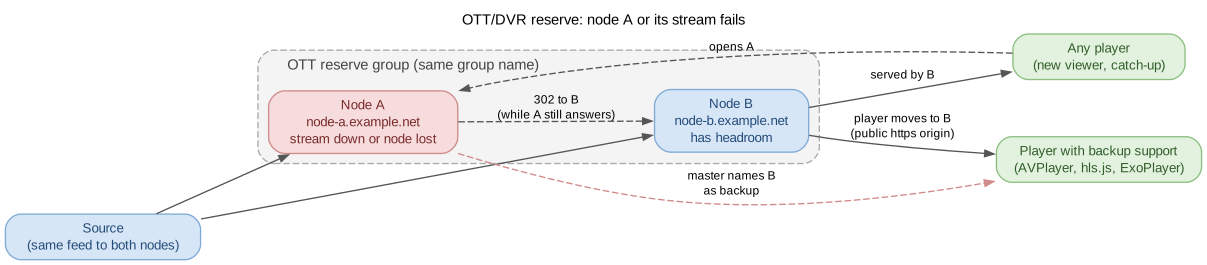
Node A fails: the player moves to node B, and new viewers and archive requests are redirected to it.
When it is needed
The channel is delivered over HLS, LL-HLS or DASH to viewers on the internet or in a large network, and the failure of one server must not stop playback.
An archive (catch-up) is needed even when recording was interrupted on one of the nodes.
Multicast receivers are protected by a different mechanism: Hot reserve of multicast outputs. Backup inputs protect against a source failure (1. Source: backup inputs), and it is worth having them on every node of the group.
What is protected in this beta version
Case |
What happens |
Limitations |
|---|---|---|
A viewer is watching, and the node or the stream fails |
The player moves to a backup node from the master playlist |
Single HLS streams with one source on the nodes; players that support backup variants (Players and the OTT/DVR reserve) |
A new viewer opens a stream that is not running on the node |
A |
Any player; HLS, LL-HLS and DASH |
An archive request for a period the node does not have |
A |
The node is chosen by archive range; the node serves gaps within its range itself |
Adaptive bundles, LL-HLS and DASH are protected only by the redirect on opening: a viewer who is already watching reopens the stream when the node fails. Subtitles stay on the original node after the move.
Nodes and the group
How many. Two nodes or more. The master playlist names up to two backup nodes for each viewer, chosen evenly, so the viewers of a failed node are spread over all eligible nodes of the group (Capacity).
Domain and reserve. All nodes are in one Meshwork domain with the Meshwork reserve switched on. A viewer comes to a backup node with a pass, a signed permission to watch from another node. It is signed with the view key, which the nodes agree on by themselves. The nodes’ clocks must differ by no more than 240 seconds.
Group. The stream or adaptive bundle has “OTT reserve” switched on, and the “Reserve group name” is the same on all nodes where the channel runs.
One source. The move during playback works between members that have a proven single source: the nodes take the same stream, not each its own.
Version. A member is a node’s stream or bundle in an OTT group. A member on a node with a version earlier than 2.1.0.456 does not accept viewers: update all nodes of the group.
Connection limit. The login’s “Max connections, HTTP/HLS” applies on each node separately: a redirected subscriber can open the same number of sessions on another node as well.
Node addresses
The player opens the backup node directly, at the address that node announces, bypassing the node the viewer came from and bypassing any shared load balancer.
A public address on every node. Set the “Host name” of each node’s HTTP server (Streaming HTTP server): a DNS name reachable by viewers, for example
node-b.example.net. Without it, the node announces its own address and only over HTTP.Public viewers, public addresses. To a viewer on a public address, a node does not offer a backup with a private address (the problem “A node has only private addresses for backups”).
HTTPS. A viewer over HTTPS, including one behind a proxy that passes
X-Forwarded-Proto: https, is offered only backups with an HTTPS address. Each node’s certificate must be issued for its “Host name” (the problem “A node has no https address for backups”).Proxy. The node judges the viewer’s address by the connection and does not read
X-Forwarded-For. Behind a proxy with a private address all viewers look private, and the rule about public addresses does not work: give the nodes public addresses.Cache and CDN. A CDN is fine in front of each node’s main addresses; a shared CDN name for several nodes does not work for backup addresses (8.1. OTT/DVR reserve and CDN).
Capacity
When a node fails, its viewers are spread over the other eligible nodes of the group: each viewer moves to one of its two backups, and the backups are chosen evenly across viewers. Out of N eligible nodes, each remaining one gets about 1/(N−1) of the failed node’s viewers. Plan CPU and network interface headroom on every node for 1 + 1/(N−1) of its normal load: double with two nodes, one and a half times with three.
A node counts as eligible only while it, at the same time:
is offered as a backup (the “Backup” column shows “Can back up”) and has served the live window (the latest live segments in the playlist) within the last 10 minutes;
takes the same source (the “Same timeline” transition);
serves HLS over MPEG-TS with renditions of the same codec (for an adaptive bundle, with a bitrate at most 1.25 times higher);
differs from this node’s clock by no more than 240 seconds and holds the view key;
is not overloaded.
Overload protection shields a backup node but adds no capacity. A node does not take a new viewer of another node when:
CPU or network load is above the error thresholds in the alert settings (Alerter);
the “Failover sessions cap” is reached.
A node never refuses its own viewers (Overload protection). On a refusal, the player goes to its second backup.
If both backups refuse, the viewer loses the stream. Refusals for longer than 30 seconds raise alert code 79 (reserve-ott-overload): the headroom is not enough.
Archive
For a redirect to the archive, the archive of the request’s protocol counts: MPEG-TS for HLS, fMP4 for LL-HLS and DASH. The archive depth can differ between the nodes: the request goes to the node that holds the larger part of the period. The node is chosen by archive range, from the oldest recording to the newest; the node serves gaps within its own range itself. Archive storage: DVR: the stream archive.
Players
The move during playback is available to players that can switch to backup variants: AVPlayer (Safari, iOS, tvOS), hls.js and similar players in the browser, ExoPlayer and Media3. VLC, ffmpeg-based players, mpv, Kodi and set-top boxes without a User-Agent are not given backup variants and reopen the stream when the node fails; then the redirect takes effect. What has been tested for each player, and audio and video in browsers: Players and the OTT/DVR reserve.
For your own player based on hls.js: set short playlist and segment loading timeouts, about one target segment duration, and the move takes seconds.
Before going live
On the “Reserves” screen the OTT group has the state “Backed up”, with no problems; the “OTT view key” block shows “In use”.
Every node has a public “Host name” set, and the HTTPS certificate is issued for it.
A trial failure (pausing the stream’s input on one node) moves the player to another node; a new viewer of this stream gets a redirect.
Alerts with codes 70, 78 and 79 are delivered to the on-call engineer (Stream redundancy).
